
Antigravity.
How I run 3 AI agents that build, test, and fix their own bugs, free.

Here’s the version of vibe coding you already know.
You ask the AI for something.
It writes it.
You run it.
It’s broken.
You copy the error, paste it back, ask it to fix the thing it just made.
It tries again.
Repeat until you’re tired.
You are the one doing the testing. You are the one finding the bugs.
You are the messenger running back and forth.
There’s a different way now, and most non-technical founders don’t know it exists because it looks, at first glance, like a tool that’s “for developers.”
It isn’t. Let me show you why.
1. What an “agent” actually is.
Forget the buzzword for a second.
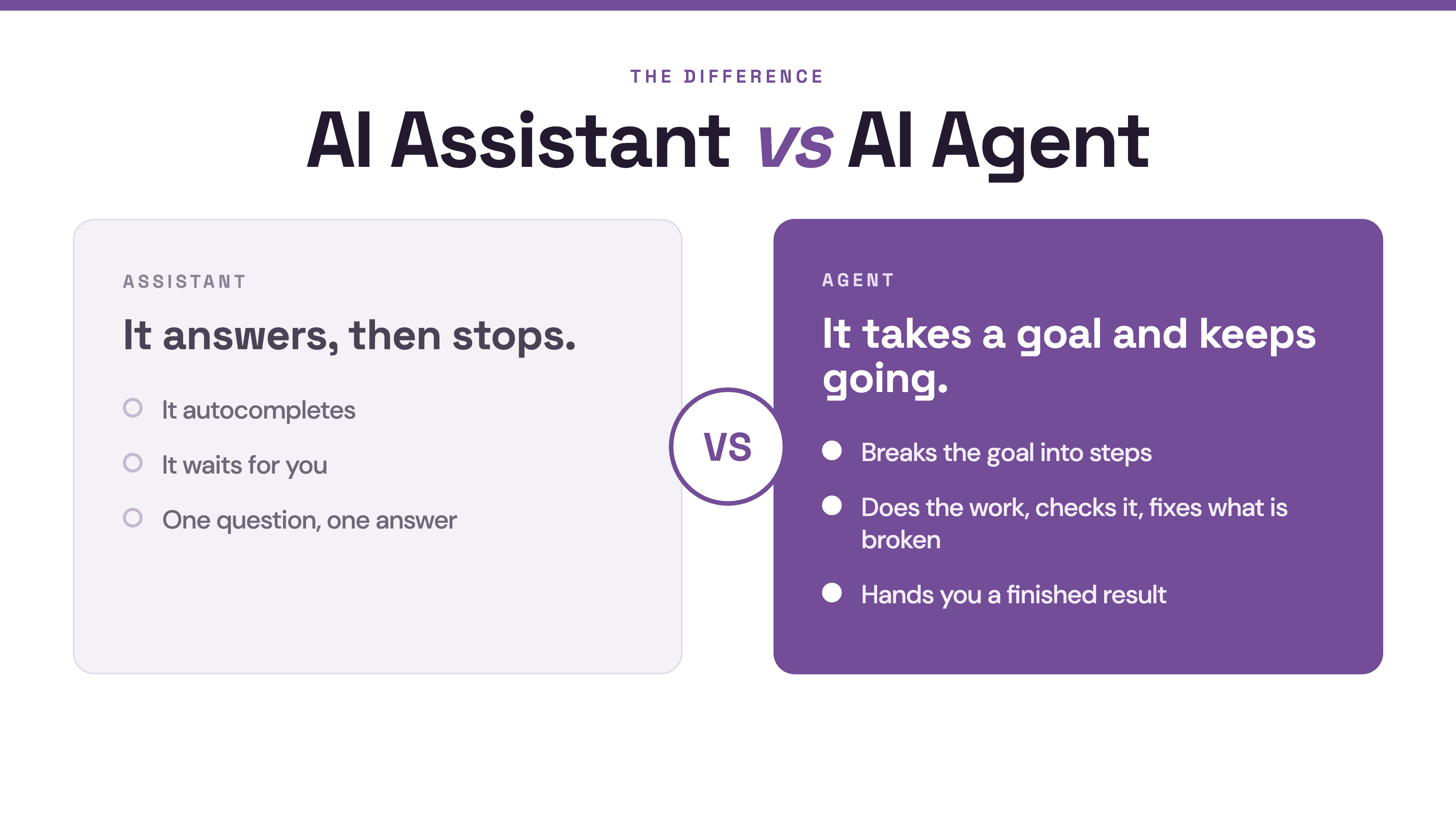
A normal AI assistant answers your question and stops.
It autocompletes.
It waits for you.
An agent takes a goal and keeps going.
It breaks the goal into steps, does the steps, checks its own work, fixes what’s broken, and hands you a finished result.
You supervise.
You don’t run the relay.
The tool I’m talking about is Google Antigravity.
And the thing that makes it different is right there in how Google describes it:
agents shouldn’t just be chatbots in a sidebar; they should have their own dedicated space to work.
Two more things make it genuinely useful for someone who doesn’t code.
First, it can run several agents at once, in parallel, and let you watch them from a single dashboard.
There’s a Manager view where you spawn, orchestrate, and observe multiple agents working asynchronously across different workspaces.
Second, and this is the one that made me sit up, it has its own built-in browser.
The agent doesn’t just guess whether the app works.
It opens a real Chrome window, clicks the buttons, fills the forms, takes screenshots, and sees what broke.
If a button doesn’t work, the agent sees it, debugs it, and fixes it, without you ever opening developer tools.
It tests its own work.
With its own eyes.
Then fixes itself.
(The first time I watched it click through my own app and quietly fix a broken button, I genuinely laughed out loud.)
2. “But this is for developers.” (It mostly isn’t.)
Antigravity is built on top of a developer’s code editor.
So when you open it, it looks technical.
That’s the wall.
But here’s the reframe.
You are not going there to write code.
You’re going there to be what Google literally calls the role: an Agent Manager.
You hand out the work.
You review the result.
You make the calls.
Instead of writing boilerplate, you become an “Agent Manager,” reviewing plans and verifying outputs, and Google notes this actually requires higher judgment, not coding skill, to make sure the AI isn’t introducing subtle problems.
Judgment. Not syntax. That you already have.
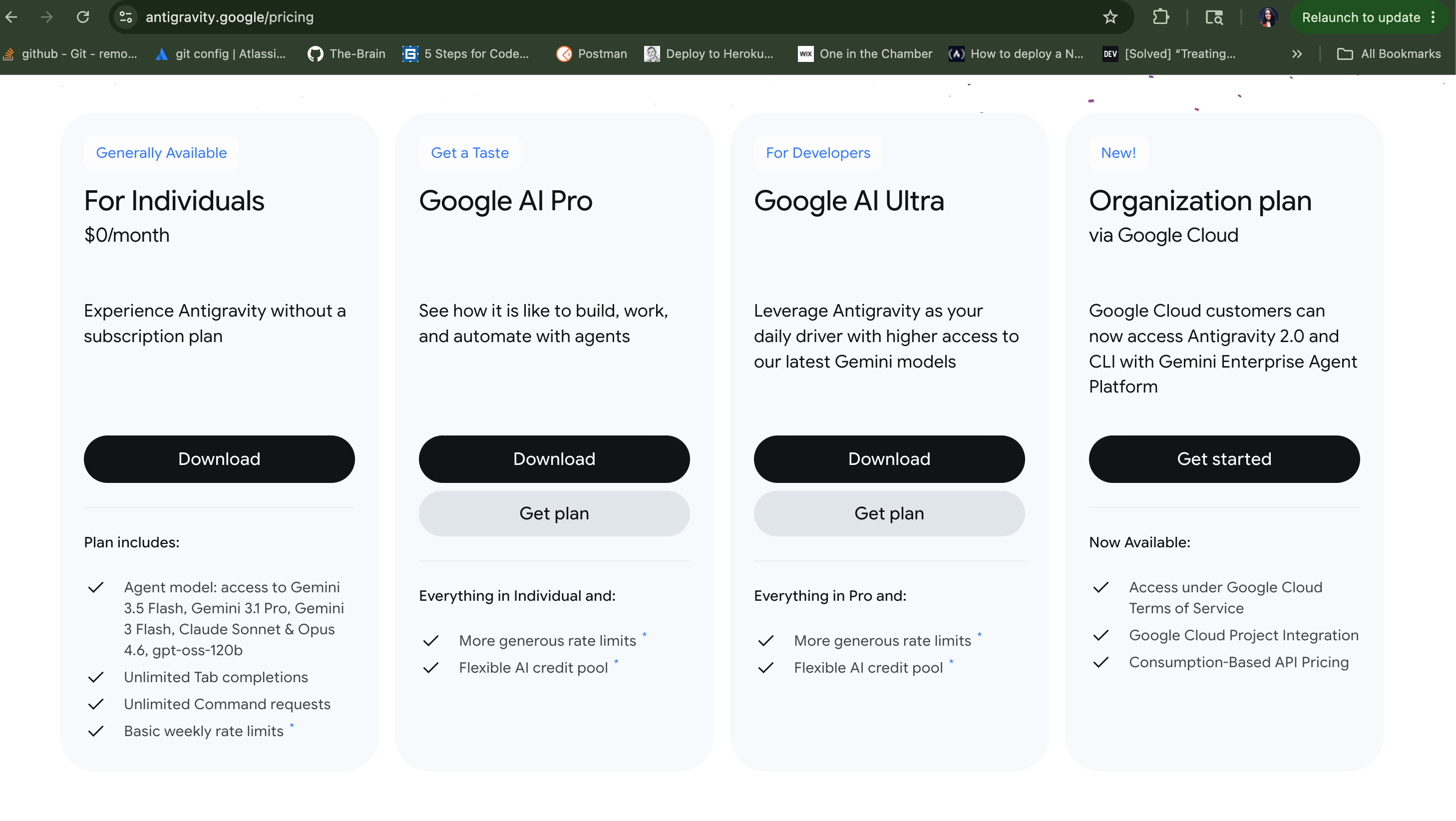
And the price, right now: it’s free.
Google Antigravity has a free tier at $0/month with a limited number of daily agent requests on the Gemini Flash model.
So: free to learn, looks scarier than it is, and the job it asks of you is the job you’re already good at.
Let’s use it.
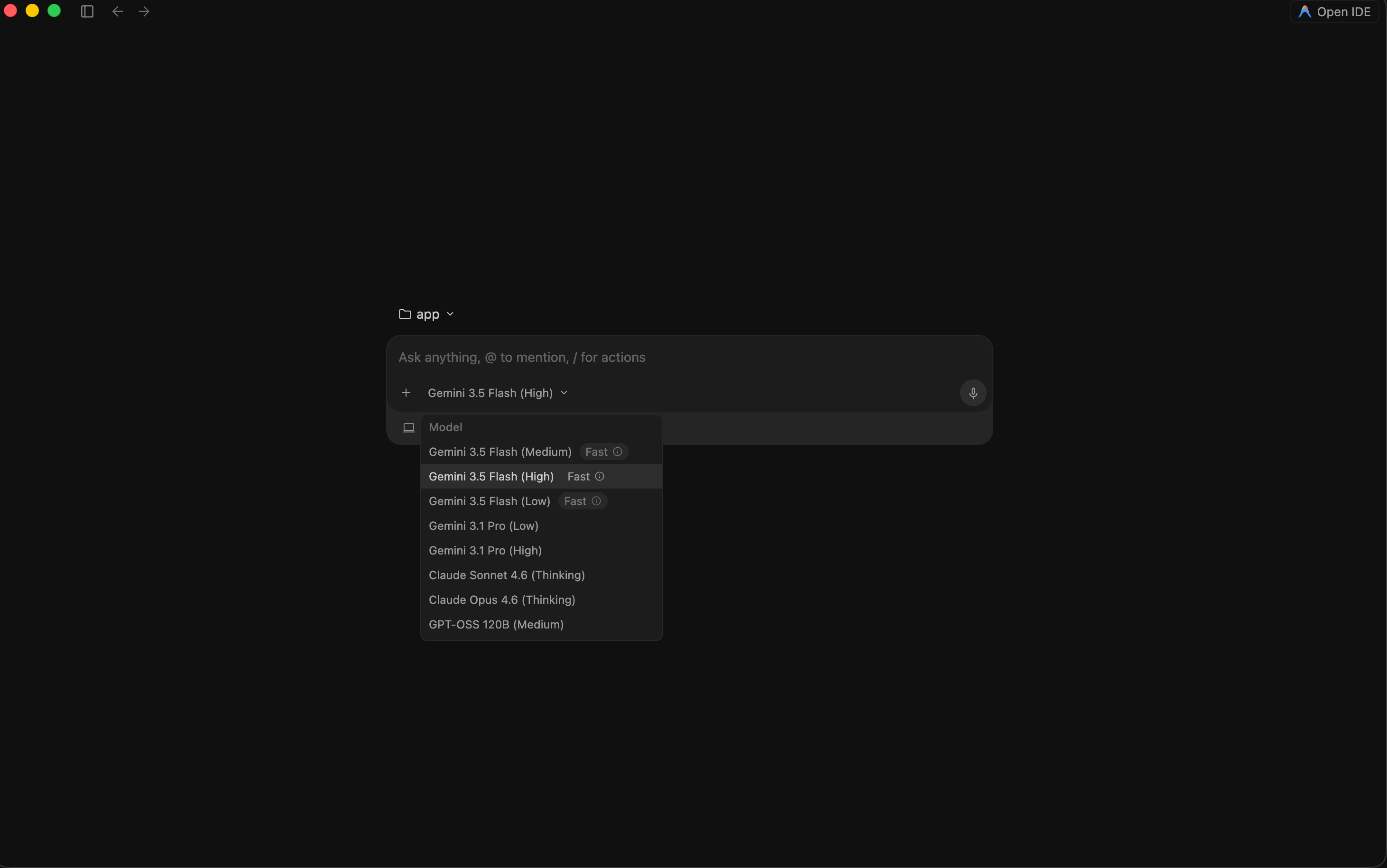
3. Your first run, keep the leash short.
Don’t start with “build my whole app.”
Start with one clear, contained task so you learn how the agent behaves before you trust it with more.
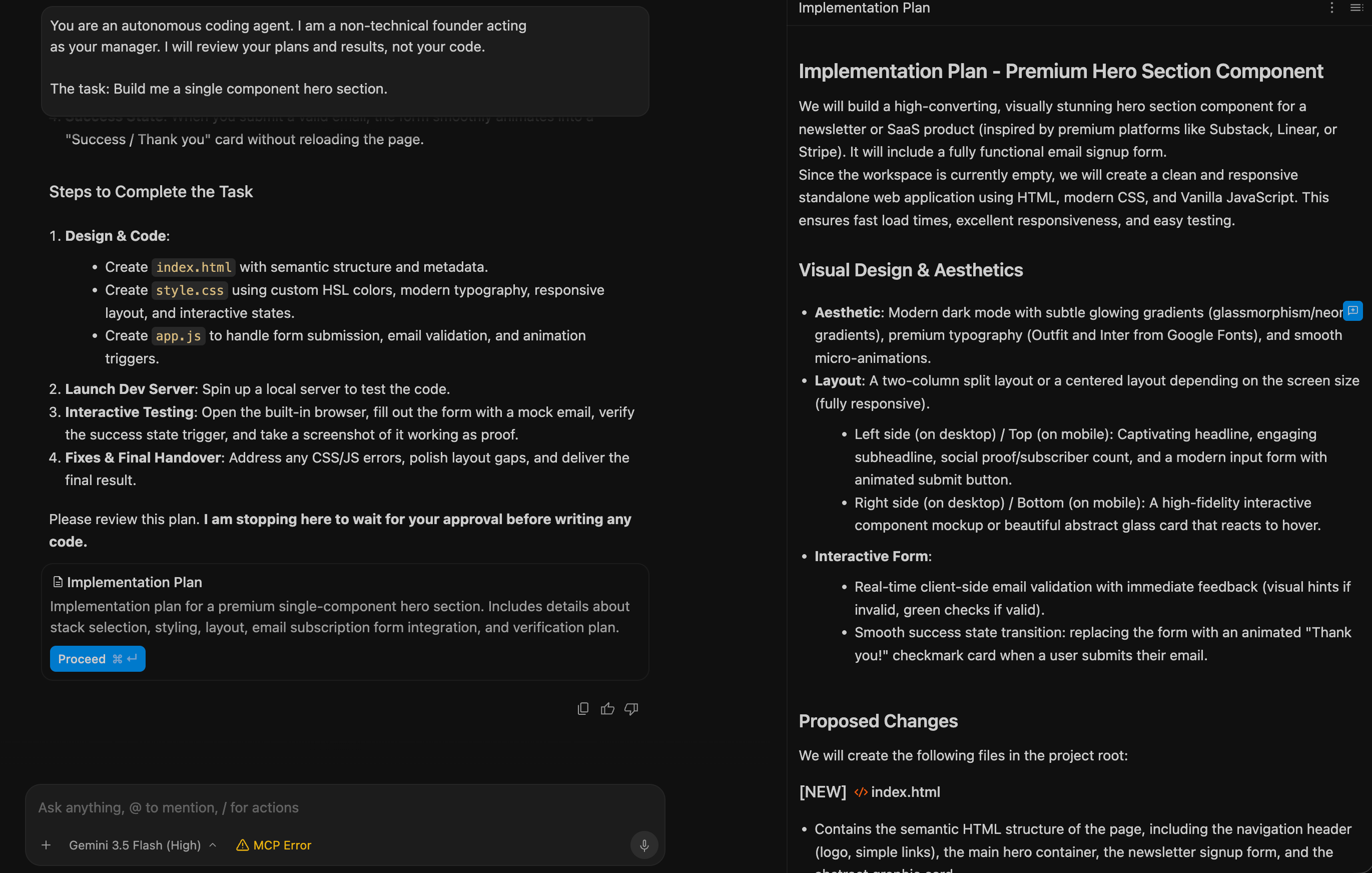
Here’s the first prompt I’d give it.
Notice it asks the agent to plan first and wait, that’s your safety rail.
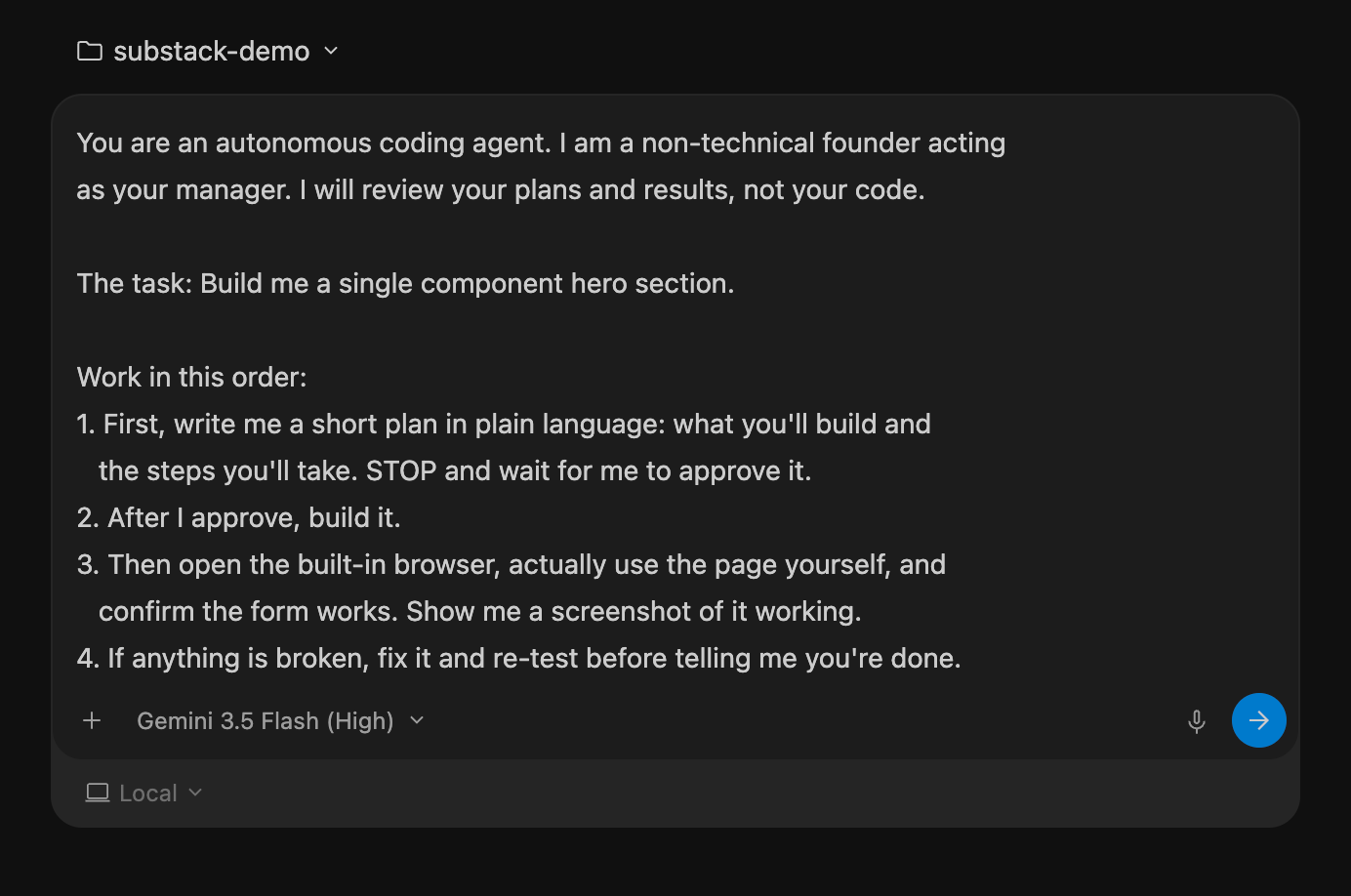
You are an autonomous coding agent. I am a non-technical founder acting
as your manager. I will review your plans and results, not your code.

The task: [ONE CLEAR, SMALL TASK — e.g. "build a single web page with a
working contact form: name, email, message, and a submit button that
shows a success message when filled in correctly"]

Work in this order:
1. First, write me a short plan in plain language: what you'll build and
   the steps you'll take. STOP and wait for me to approve it.
2. After I approve, build it.
3. Then open the built-in browser, actually use the page yourself, and
   confirm the form works. Show me a screenshot of it working.
4. If anything is broken, fix it and re-test before telling me you're done.

Do not skip the testing step. I want to see proof it works, not just a
claim that it does.
Approve the plan.
Let it build.
Then… this is the good part… watch it open its own browser and test the thing it made.
When it shows you a screenshot of the working form, you’ve just experienced the whole point: the agent did the loop you used to do.
4. The part that feels like cheating, running several at once.
Once you trust one agent on one task, you can do something a single chat window never let you do.
You can give different agents different jobs, at the same time, and check on all of them from the Manager view.
No other mainstream tool offers this multi-agent orchestration the way Antigravity does, it’s the actual headline feature.
For a founder, here’s where it earns its keep.
Say you’ve got a small app and three loose ends.
Instead of doing them one after another in one long, tangled conversation, you spin up three agents:
I'm going to give you three separate tasks. Treat each as its own
isolated job. For each one: plan first, build, then test it yourself in
the browser, then report back with a screenshot proving it works.

Task A: [e.g. "make the sign-up form show a clear error if the email is
left blank"]

Task B: [e.g. "add a simple loading spinner while data is saving"]

Task C: [e.g. "make the whole layout look correct on a phone screen"]

Keep them separate so a problem in one doesn't affect the others. Tell
me which are done and which need my input.
Three jobs.
Running in parallel.
You sip your coffee and review the results as they land.
(This is the moment the “I’m just one non-technical person” feeling starts to dissolve. You’re not one person anymore. You’re managing a small team that doesn’t sleep.)
5. Three ways this goes wrong, and the fix.
I love this tool.
I also watched it trip people up.
Here’s where, and what to do.
Break #1: The agent runs off and builds the wrong thing.
You gave it a fuzzy goal, it filled the gaps with guesses, and now it built something you didn’t want.
Fix: the “plan first, then stop and wait for approval” line in every prompt.
Read the plan.
If it’s wrong, correct it before it builds. Cheap to fix a plan. Expensive to fix a finished mess.
Break #2: It says “done” but it’s not.
An agent can be confidently wrong.
Fix: never accept “it works” as words.
Demand the screenshot.
The whole reason this tool is special is that it can test itself, so make it.
“Show me proof, tested in the browser” belongs in every task.
Break #3: It gets slow and forgetful on a long session.
This is a known thing.
The longer the conversation, the more memory it’s holding, and it can lag or lose the thread.
The common fix is simply to restart the window and start a fresh task once you’ve got a working result saved.
Fix: work in short, finished chunks.
Get a piece working, confirm it, start fresh for the next piece.
Don’t run one marathon session for six hours.
(Number three is just good practice anyway. Small, finished, saved. Then the next thing.)
6. Pick the right tool for the right job.
I’m not going to tell you Antigravity replaces everything.
It doesn’t, and pretending otherwise would be the hype I don’t do.
Here’s how I actually think about it:
Lovable or AI Studio: when you want the fastest path from idea to a first working version, especially with a nice design. Start here.
Antigravity: when you’ve got something built and you want agents to extend, test, and fix it for you, in parallel, with proof. The “make it better and prove it works” stage.
A pattern a lot of builders are landing on in 2026: use the fast builders to validate an idea quickly, then bring in agent tools for the deeper, longer work.
Different instruments.
Same song.
You don’t have to pick one forever.
You pick the one that fits the job in front of you this week.
7. The loop you now own.
Here’s the repeatable process.
This is the thing I’d want you to walk away with.
Give a small, clear goal → make the agent plan first → approve the plan → let it build AND test itself → demand the screenshot proof → run several in parallel once you trust it → save the win → start fresh for the next piece.
That’s it.
That’s the agent-manager loop.
It works whether you’re fixing one button or extending a whole app.
The skill here was never coding.
It’s giving clear instructions, reading a plan critically, and refusing to accept “done” without proof.
You’ve done all three in every job you’ve ever had.
Now you’re doing it with a team of agents that work for free, in parallel, while you watch.
Now you own this process.
Two ways to take this further, depending on what you need.
If you want to build this yourself, the community is where we actually run agents together every week, share the prompts that work, and pool the fixes for when things get weird.
Tool this new, having other founders a step ahead of you is worth more than any tutorial.
→ Join Prompts2Products ($29.99/month)
If you’d rather hand it off, my agency Arehsoft uses these exact agentic workflows to build products for founders, faster than the old way, and properly tested.
→ Schedule a free consultation call
Both paths work.
Just different timelines and different levels of hands-on.
Here’s the bonus, my “Agent Manager” review prompt.
After an agent says it’s finished, I paste this to pressure-test the result before I believe it.
Seven years in, the lesson that stuck is: trust, but verify.
This automates the verify.
You are reviewing the work another AI agent just completed for me. I'm
a non-technical founder. Be skeptical on my behalf.

What the agent was asked to do: [PASTE THE ORIGINAL TASK]
What the agent says it did: [PASTE ITS "DONE" MESSAGE]

Now verify it for real:
1. Open the built-in browser and actually use the feature yourself.
2. Try to break it the way a careless real user would.
3. Check that nothing ELSE broke as a side effect of this change.
4. Confirm no secret keys or private data got exposed in the process.

Report back in plain language: what genuinely works, what's actually
broken, and what the agent claimed but didn't really finish. Include a
screenshot for anything you say works. Don't take the agent's word for
anything — including your own.
I’m not here to sell you on agents, or on Google, or on the idea that the old way is dead.
I share what I actually use.
Right now I’m running agents that build, test themselves in a real browser, and fix their own bugs while I review the proof, for free.
Two weeks ago this got a major upgrade, so I’m telling you about it.
100+ founders read this because someone they trusted sent it to them.
If this one was useful, be that person for someone else.
If someone sent you this, you can subscribe here: