
Publish.
The exact 5-step system to go from AI Studio prototype to a live Firebase app, without writing code.

Most prototypes never become products.
Not because the idea was bad.
Not because the founder gave up.
Because somewhere between “this works in AI Studio” and “this is live with a real URL,”
there’s a gap no one tells you about before you find yourself in it at 11 pm, wondering which button you pressed wrong.
I’ve built enough of these to know exactly where that gap is.
I’ve also been testing what I/O 2026 changed about closing it, specifically the new AI Studio → Firebase pipeline that Google shipped last week.
This is the complete system.
Five steps.
Every prompt included.
Every failure mode named.
By the end of this, you’ll have either shipped something, or you’ll know exactly what stopped you and how to fix it.
This only works if you actually run it.
Don’t read it like a tutorial.
Run it like a build session.
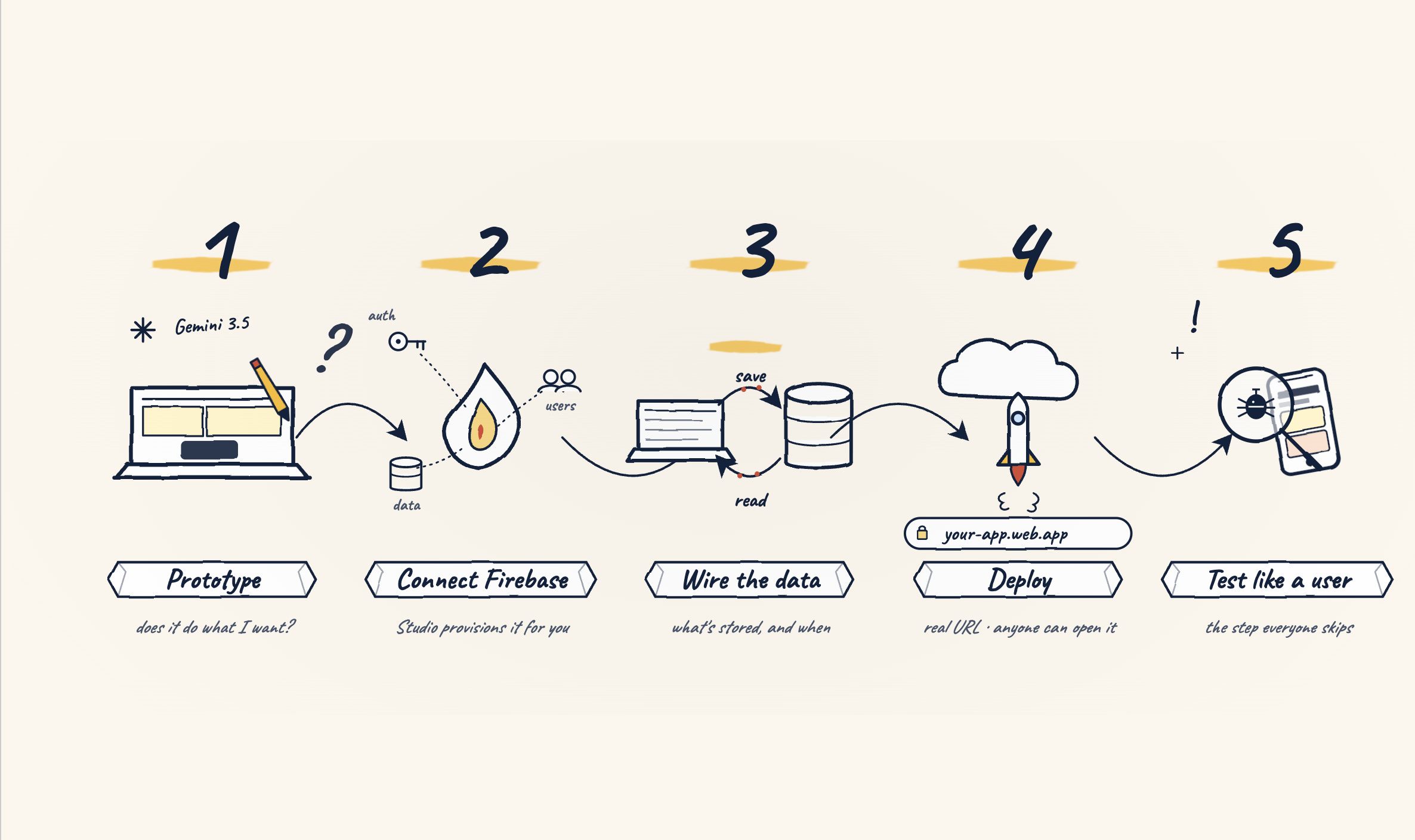
1. The system overview, what all five steps actually are
Here’s the map before we build it.
Step 1: Prototype in AI Studio:
Build the interface and logic of your app using Gemini 3.5 Flash.
No backend yet.
Just: Does this do what I want?
Step 2: Connect Firebase:
Set up the Firebase project that will hold your data, your users, and your authentication.
AI Studio now provisions this for you directly.
Step 3: Wire the data:
Connect the prototype to a real Firestore database.
Define what gets stored and when.
Step 4: Deploy to Cloud Run or Firebase Hosting:
Get a real URL. Real app. Anyone can open it.
Step 5: Test like a user, not a builder:
The step everyone skips.
Walk through your app as if you’ve never seen it before.
Find what breaks before your actual users do.
The whole system, from opening AI Studio to a live URL: one afternoon if you’ve done it before, one long evening if this is your first time.
I’ve timed it.
The bottleneck is almost never the technical part, it’s knowing what to type at each step.
That’s what the prompts below are for.
LET’S GET INTO IT.
2. Step 1: Build your prototype in AI Studio
What this is:
The prototype is the version that proves your idea works before you’ve connected anything.
It’s not your final product.
It’s the version that answers: “does this do what I think it does?”
Why this step exists before Firebase:
Most people try to connect a database before they know what data they actually need.
That’s backwards.
Build the interface first.
Watch what it asks for.
Then connect the data.
Use this prompt:
You are helping me build a working prototype of a web app using Google AI Studio and Gemini.

My app: [describe your app in 2-3 sentences — what it does, who uses it, what problem it solves]

What I want built in this session:
- A working interface that [specific user action] can perform
- Clean design, minimal elements, nothing unnecessary
- Placeholder data where real data would be — I'll connect the real database in the next step

For each part of the interface:
1. Show me what it looks like
2. Tell me what data it will need to store when a real user interacts with it
3. Flag anything that will require a backend service (auth, database, file storage)

Constraints:
- I am not a developer — explain every technical term in plain language
- Use free or open-source tools wherever possible
- Don't write backend code yet — I want to see and validate the interface first
- If you're making design decisions, explain why you made them so I can change them

Start with the main screen a user would see when they first open the app. Show it, then explain it.
Common mistake #1:
Building too much in the prototype.
I’ve done this.
You build the whole app in AI Studio, fall in love with how it looks, then realize it needs 12 Firebase collections and 3 auth providers and you have no idea how they connect.
Fix: build one feature, validate it works, then add the next.
Don’t prototype the whole product at once.
(Seven years in and I still catch myself doing this. The prototype is a test, not the product.)
What the prototype step looks like when you run the prompt above.
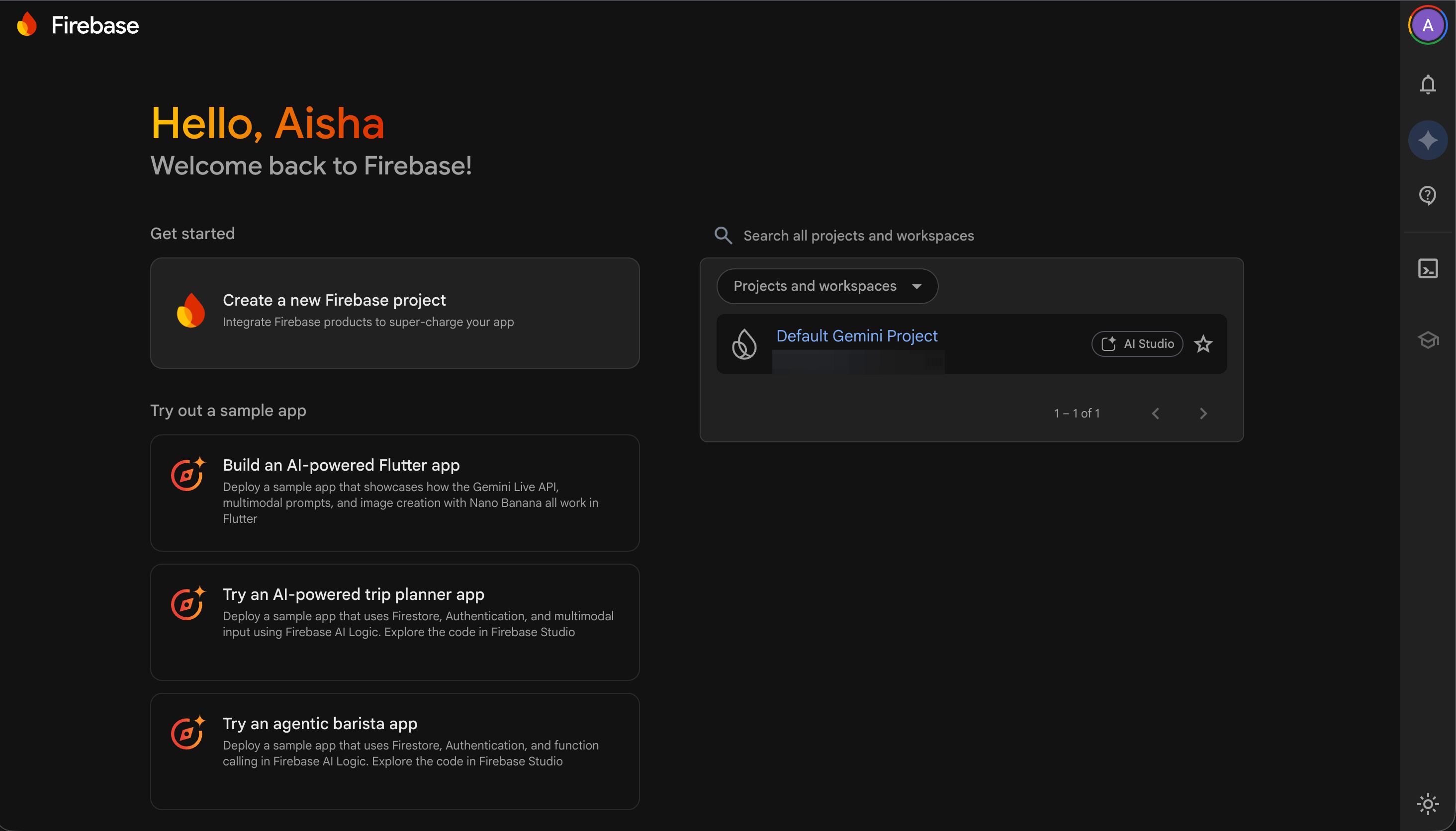
3. Step 2: Connect Firebase
What this is:
Firebase is where your app’s data lives.
After I/O 2026, AI Studio can provision a Firebase project for you directly,
meaning it sets up the database structure you’ll need based on what the prototype showed.
How to do it:
Inside your AI Studio project, look for the integration option.
It may appear in the project settings (sidebar panel).
When you connect it, you’re telling AI Studio: “the data this app needs should live here.”
If you already have a Firebase project from a previous build, you can connect that.
If you don’t, Firebase will create a new one for you.
The free tier (Spark plan) is generous enough for prototypes and early-stage products.
Run this inside AI Studio after the prototype is built:
I've built a prototype of my app. Now I need to connect it to Firebase.

My app does: [repeat your app description from Step 1]

Based on the prototype we just built, I need you to:
1. Tell me exactly what Firestore collections I need — name each one and explain what it stores
2. Tell me whether I need Firebase Authentication, and if so, which sign-in methods (email/password, Google sign-in, or both)
3. Tell me if I need Firebase Storage for any file uploads
4. Write the Firebase security rules I should start with — explain each rule in plain language before writing it
5. Tell me what could go wrong at this step and how to prevent it

Constraints:
- I am not a developer — explain every technical term
- Default to the simplest Firebase structure that works — not the most sophisticated one
- Firebase free tier (Spark plan) only — tell me if anything I'm describing would require an upgrade
- Write security rules that are functional but not over-engineered for an early prototype

⚠️ Before writing any rules or collections: ask me 2 clarifying questions about my app's data and users that would change your recommendations.
Common mistake #2:
Over-engineering the database on the first build.
You don’t need 15 collections for a prototype.
You probably need 2.
Start with the minimum structure that makes the app work.
You can add complexity later, you can’t easily simplify a complex structure once it has real user data in it.
Connecting AI Studio to Firebase, from inside the browser.
4. Step 3 & 4: Wire the data & Publish
Wiring the data:
This is the step where the prototype becomes functional, where a real user typing into your form actually saves something to Firestore that you can see in the Firebase console.
My prototype is built and my Firebase project is connected.

Now I need to wire real data to the prototype.

My Firestore collections are: [list the collections from Step 2]

For each collection, I need:
1. The exact code or configuration to connect my AI Studio prototype to that collection
2. What triggers a write to the database (when does something get saved?)
3. What triggers a read (when does the app retrieve data?)
4. What a successful test of each connection looks like — how will I know it's working?

Constraints:
- I am not a developer. Explain every step before asking me to do it.
- If you need me to add any code, write it completely — no placeholders, no "fill this in yourself"
- Tell me what to look for in the Firebase console to confirm each connection worked
- Flag any step where something commonly goes wrong

⚠️ After explaining each step, ask me: "Does this make sense before I continue?"
Publishing:
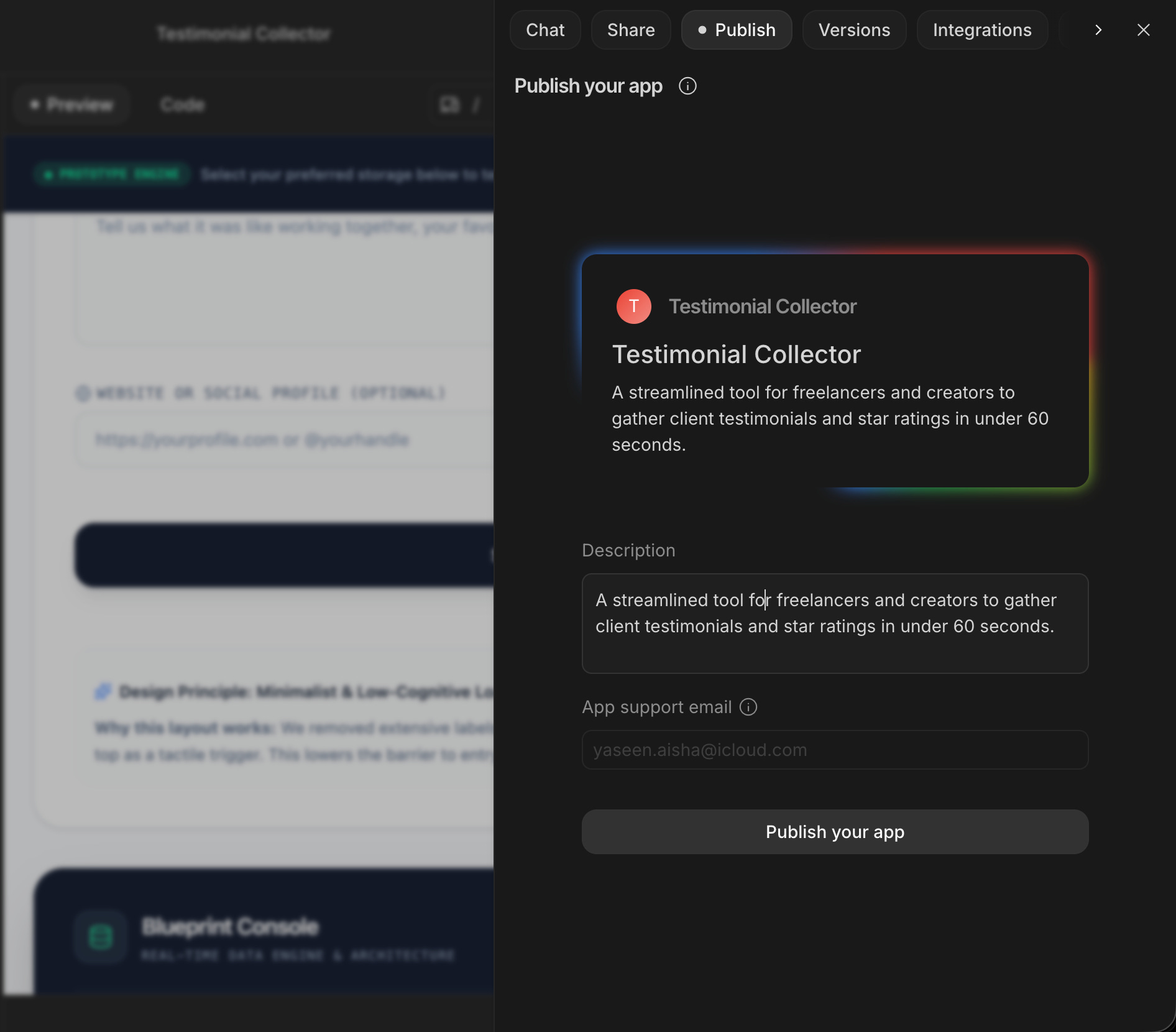
After I/O 2026, AI Studio has a deploy option that sends your project to Cloud Run or Firebase Hosting.
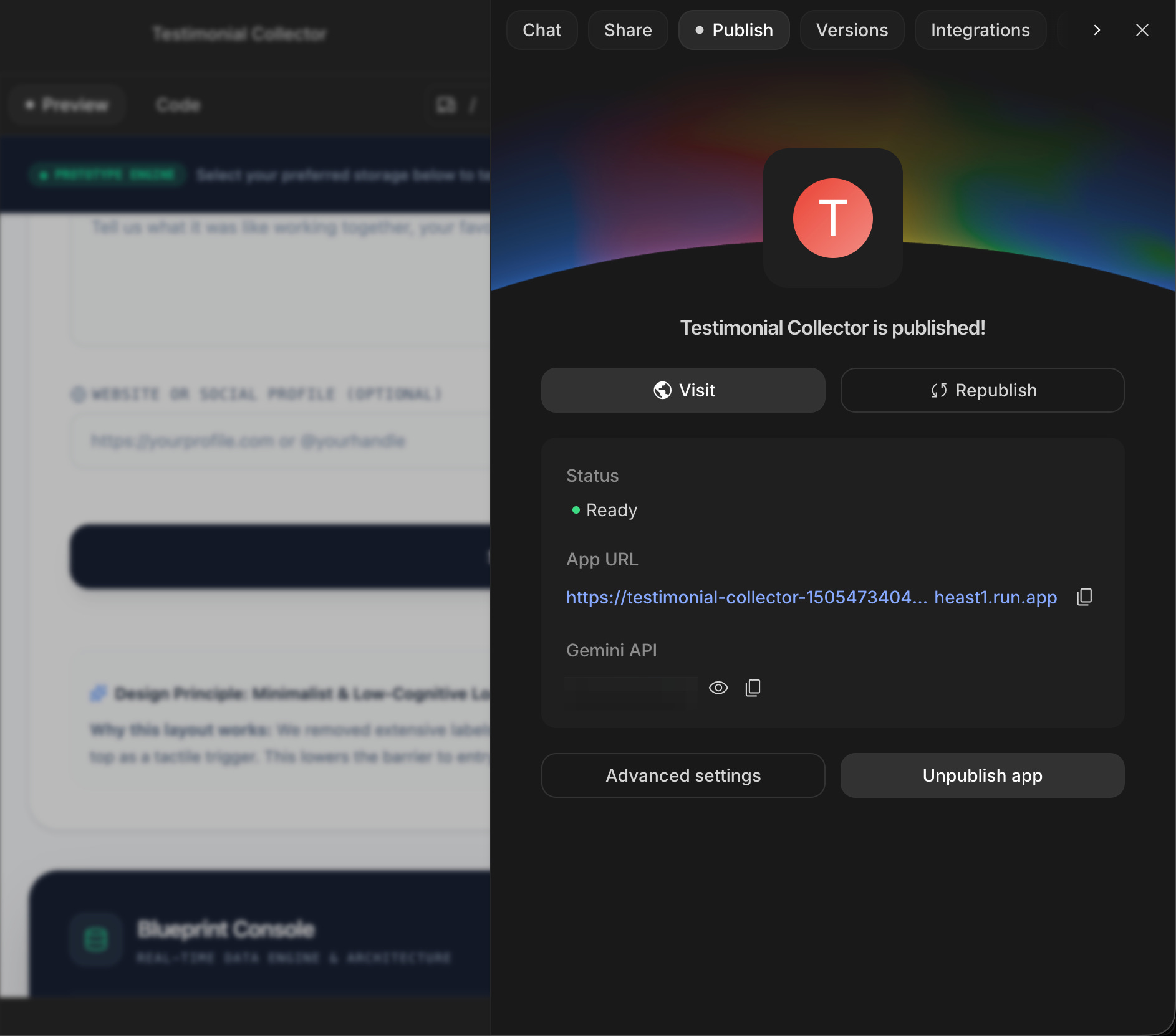
The concept: once your prototype is wired and you’ve tested it, you’ll use the publish option inside AI Studio to generate a real URL.
That URL is your app. It’s live. Anyone can open it.
Firebase Hosting has a free tier that handles early-stage traffic well.
Cloud Run scales automatically and also has a generous free tier.
I'm ready to deploy my app to Firebase Hosting (or Cloud Run).

Before I deploy:
1. What tests should I run to make sure the app is ready?
2. What security checks should I do before real users can access it?
3. Walk me through the deploy process step by step — in plain language
4. What does a successful deploy look like? How will I know it worked?
5. What's the first thing I should do after it's live?

Constraints:
- Explain every step in non-technical language
- Tell me what I should NOT do in the first 24 hours after deploying
- If anything requires additional Firebase configuration before deployment, flag it now
(Most founders I talk to remember the exact moment they opened their first live URL.)
5. Step 5: Test like a user, not a builder
This is the step nobody talks about and everybody skips.
You built it. You wired it. You deployed it. You know exactly how it works,
which means you cannot test it accurately.
You need to test it like someone who has never seen it before, who doesn’t know what you intended, and who will do something unexpected.
The prompt:
I just deployed my app. I need to test it like a real user would.

My app: [describe it again in one sentence]

My typical user: [who they are, what they already know, what they don't know]

I need you to:
1. Give me a list of 10 specific actions a real user might try — include at least 3 unexpected things
2. Tell me what should happen for each action if the app is working correctly
3. Tell me what common mistakes a first-time user would make that the app should handle gracefully
4. Write 5 "edge case" tests — situations that are unlikely but would break the app if they happen

After I run through these tests:
5. Tell me what to check in the Firebase console to confirm data is being stored correctly
6. Tell me how to check if my Firebase security rules are actually blocking unauthorized access

Do NOT make the test list easy. I want to find what breaks before real users do.
Common mistake #3:
Testing only the happy path.
You fill in the form correctly, hit submit, see the success message, declare it done.
Real users fill in the form wrong.
They hit back instead of submit.
They open it on a phone with a slow connection.
They try to sign in with an email they used on a different device.
Test the ways it can break before you share the URL.
If this build system helped you ship something, send it to one founder who’s been stuck at the prototype stage.
6. How to use this system every week
You’ve shipped one thing. Here’s how to use this same system for everything you build next.
Every time you have a new feature or a new product:
15 minutes in AI Studio, describe it, see what the prototype looks like
Decide, is this worth connecting to Firebase, or is it a concept that needs more testing first?
Build it for real, if it’s worth it, follow steps 1-5 above
Document the Firestore structure, in a Google Doc, keep a running record of what collections you have and what they hold. This saves hours later.
One test session after deploy: every time, before sharing the URL
That loop takes a weekend the first time.
It takes a Friday afternoon by the fourth time.
The system doesn’t change; your speed does.
The difference between founders who ship consistently and founders who have a lot of prototypes: the ones who ship have a process they repeat.
Not talent. Not more time. A process.
Two ways to go deeper on this.
If you want to work through this system alongside other non-technical founders, and have somewhere to go when step 3 breaks in an unexpected way, the community is where we do this every week.
→ Join Prompts2Products: ($29.99/month)
If you’d rather have an amazing agency handle the build while you focus on the product decisions, that’s what we’re built for.
→ Schedule a free consultation call.
This prompt is what I put in my vault after every new Firebase build.
It’s the one I pull out when I’m handing a project off or coming back to it after a few weeks away.
You are helping me document a Firebase app I've built.

My app: [description]
My Firestore collections: [list them]
My Firebase Authentication setup: [what sign-in methods are configured]
My Firebase Hosting or Cloud Run URL: [the live URL]

I need you to:
1. Write a plain-language README for this project — as if I'm explaining it to a new developer I just hired
2. Write a summary of the security rules I have and why each one exists
3. Write a "what to do if X breaks" guide for the 5 most common Firebase issues:
   - App won't load
   - Data isn't saving
   - Users can't sign in
   - Security rules are blocking the wrong things
   - The app is running but showing old data

Make everything plain-language. Assume the person reading this knows nothing about Firebase.
I’m not selling you a Firebase course.
I’m sharing what I actually use to ship real things.
This system, AI Studio prototype, Firebase connection, Cloud Run or Hosting deploy, is what I ran before I even considered other tools.
It works because everything is in one ecosystem, the free tiers are generous, and the new I/O 2026 changes closed the biggest gaps.
You now own this process.
100s of founders read this because someone they trusted sent them an article.
If this one moves someone from prototype to deployed, be that person for them.