

You can build one folder today that seven different AI apps already know how to read.
Not a Claude thing. Not a Cursor thing.
One folder, and any app that speaks the standard picks it up and knows what to do with it. It takes about ten minutes and it costs nothing.
New here? Subscribe so the next build lands in your inbox. It is free.
It goes like this:
Understand the actual problem (your instructions are trapped in one app)
Make one folder on your computer
Put a two line file in it called plugin.json
Drop your existing skill inside the skills folder
Add your tools too, if you have any
Hand the whole folder to someone else and watch it just work
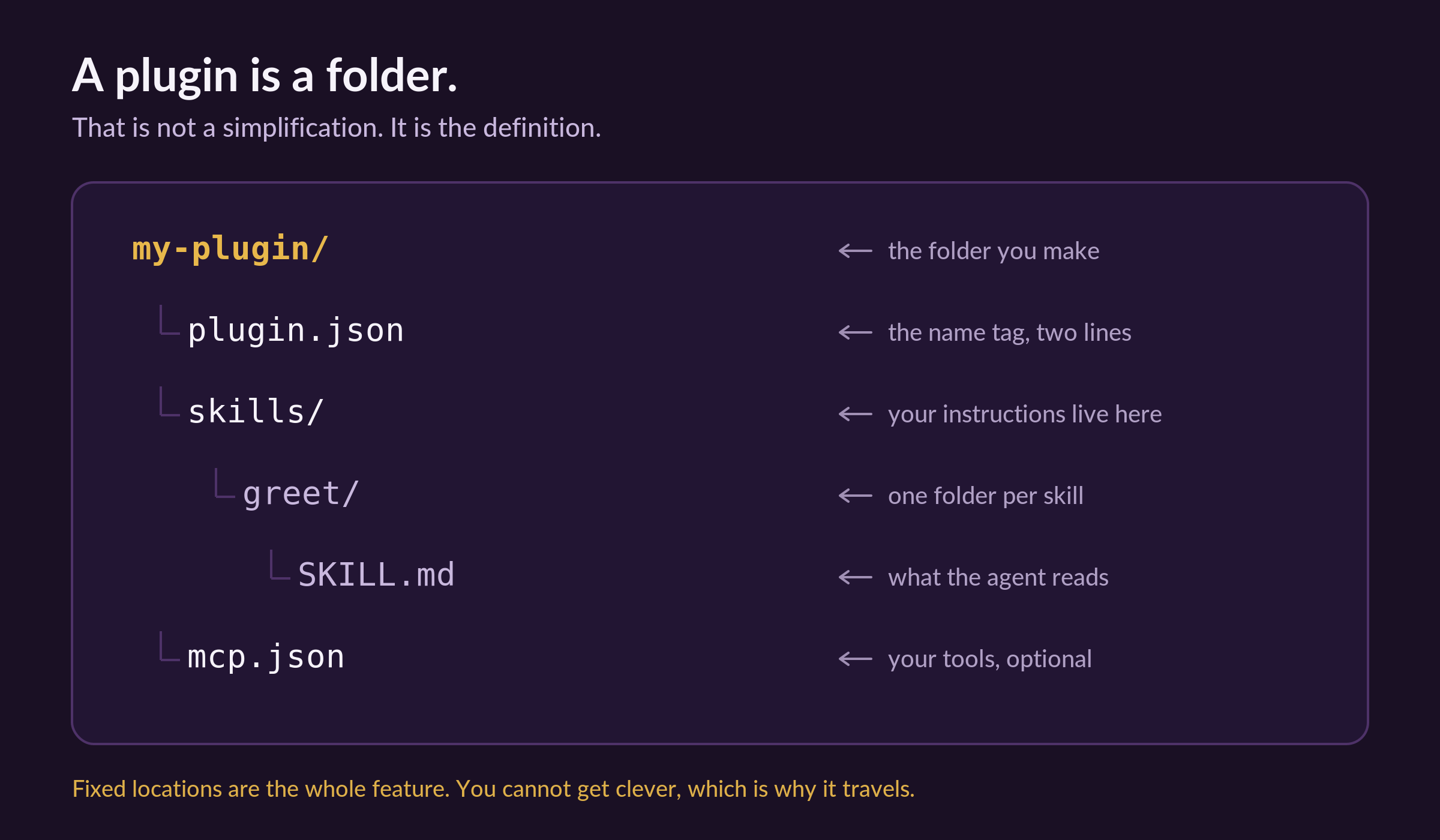
I will show you every step. But first, here is the thing you are building:
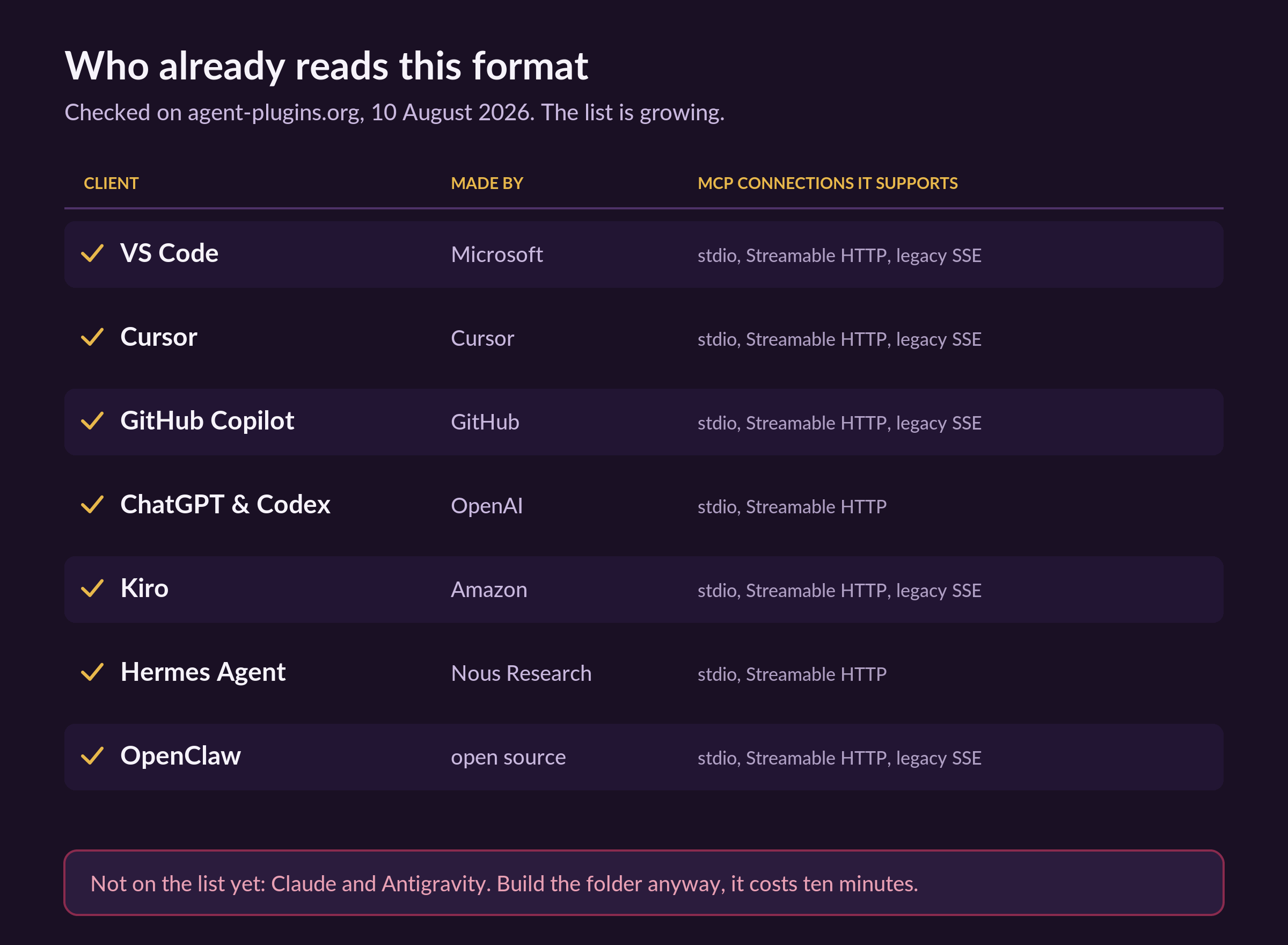
And here is who already reads that folder, checked this morning:
Two things before we start:
Save this, then block ten minutes and actually build the folder.
Send it to one person who keeps re-explaining themselves to AI every morning.
Sharing is free, and it is how this newsletter grows.
Why this one annoyed me enough to write about it
I have been a software architect and full-stack engineer for over seven years, and I have written the same instructions more times than I want to admit.
Not different instructions. The same ones.
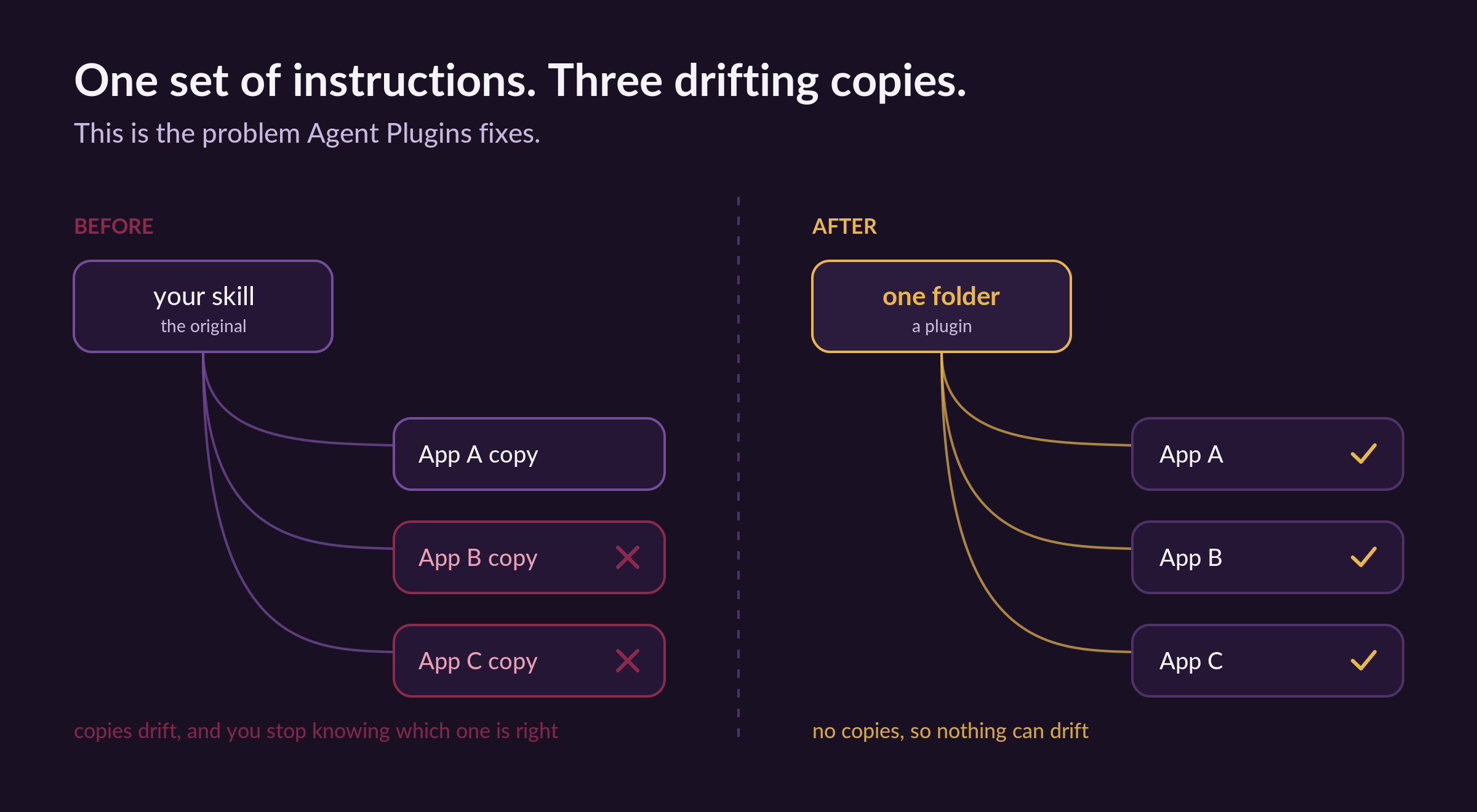
Once for Claude, then again for the coding tool, then again in a slightly different folder shape because that tool wanted it laid out its own way.
Every copy drifted.
I would fix a mistake in one and forget the other two, and three months later I could not tell you which copy was the good one.
This is exactly the article I wish someone had handed me back in January when I wrote about skills for the first time, which is roughly the moment I started making three copies of everything, and it is the kind of small structural fix the Thursday and Sunday pieces go much deeper on.
Then on the sixth of August, this got fixed.
A group of companies who normally compete published one shared shape for it.
Amazon, Cursor, Microsoft, OpenAI and Vercel maintain the standard, and Google joined them as a maintainer the same day.
That almost never happens.
When rivals agree on a file layout, it is because every single one of them was sick of the same problem.
1. First, what a plugin actually is.
Forget the word.
A plugin is a folder.
That is not me simplifying for you. That is the literal definition in the spec, and the fact that they kept it that boring is the best thing about it.
Inside the folder there are three things that matter, and you will not need all three today.
plugin.json. A tiny text file that says “this is a plugin, and here is its name.” Two lines of real content.
A skills folder. Your written instructions. If you have ever written a SKILL.md file, you already have this part done.
mcp.json. Only if your plugin needs to reach out and touch something, like a database or an app you use. Skip it entirely if you are just packaging instructions.
Here is the important bit, and it is the reason this works at all.
The locations are fixed.
You cannot put your skills somewhere clever and then tell the app where you hid them.
Skills go in skills/.
Tools get declared in mcp.json.
Always, in every plugin, in every app. (This sounds like a limitation. It is the entire feature. Fixed locations mean nobody has to guess, which means nobody has to write a special version for each app.)
One more thing worth knowing before you build.
If one piece breaks, the rest still loads.
If your tool config fails to start, the app skips it, loads your instructions anyway, and tells you what went wrong.
(Anyone who has watched one broken line take down an entire config file will understand why I care about this so much.)
2. Now build one, and yes it really takes a minute.
We are going to make the smallest real plugin that exists.
It does one silly thing.
That is on purpose, because once the shape is in your hands, the useful version is just typing.
Step 1: On your computer, make a new folder. Put it somewhere you will find again, like Documents. Name it my-first-plugin.
Step 2: Open that folder. Make a new plain text file inside it. Name it exactly plugin.json.
(Watch the file extension. If your Mac saved it as plugin.json.txt, rename it. This trips up almost everyone once, including me.)
Step 3: Open plugin.json and put this inside it:
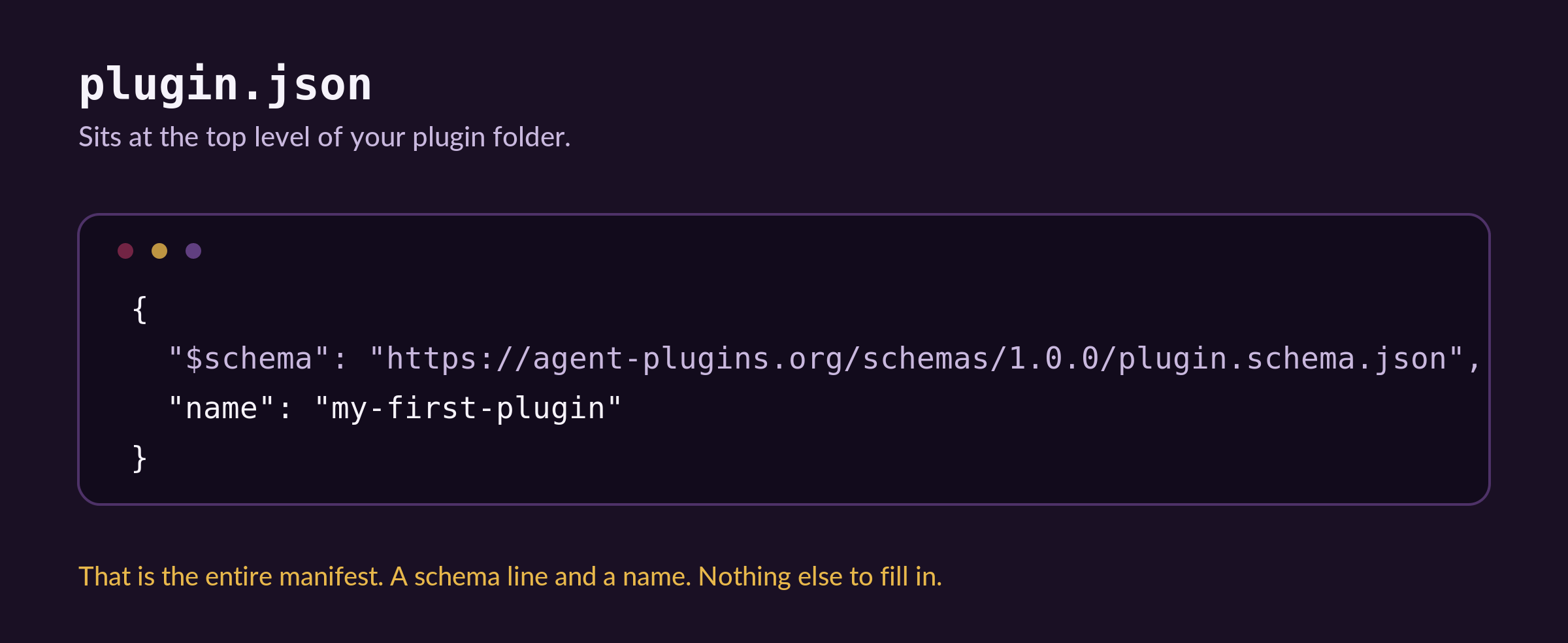
Step 4: Save it and close it. That is the whole manifest. There is nothing else to fill in.
(I stared at it for a while, waiting for more fields to appear. There are none.)
Step 5: Back in my-first-plugin, make a new folder called exactly skills.
Step 6: Inside skills, make another folder called greet.
Step 7: Inside greet, make a plain text file called exactly SKILL.md, and put this in it:
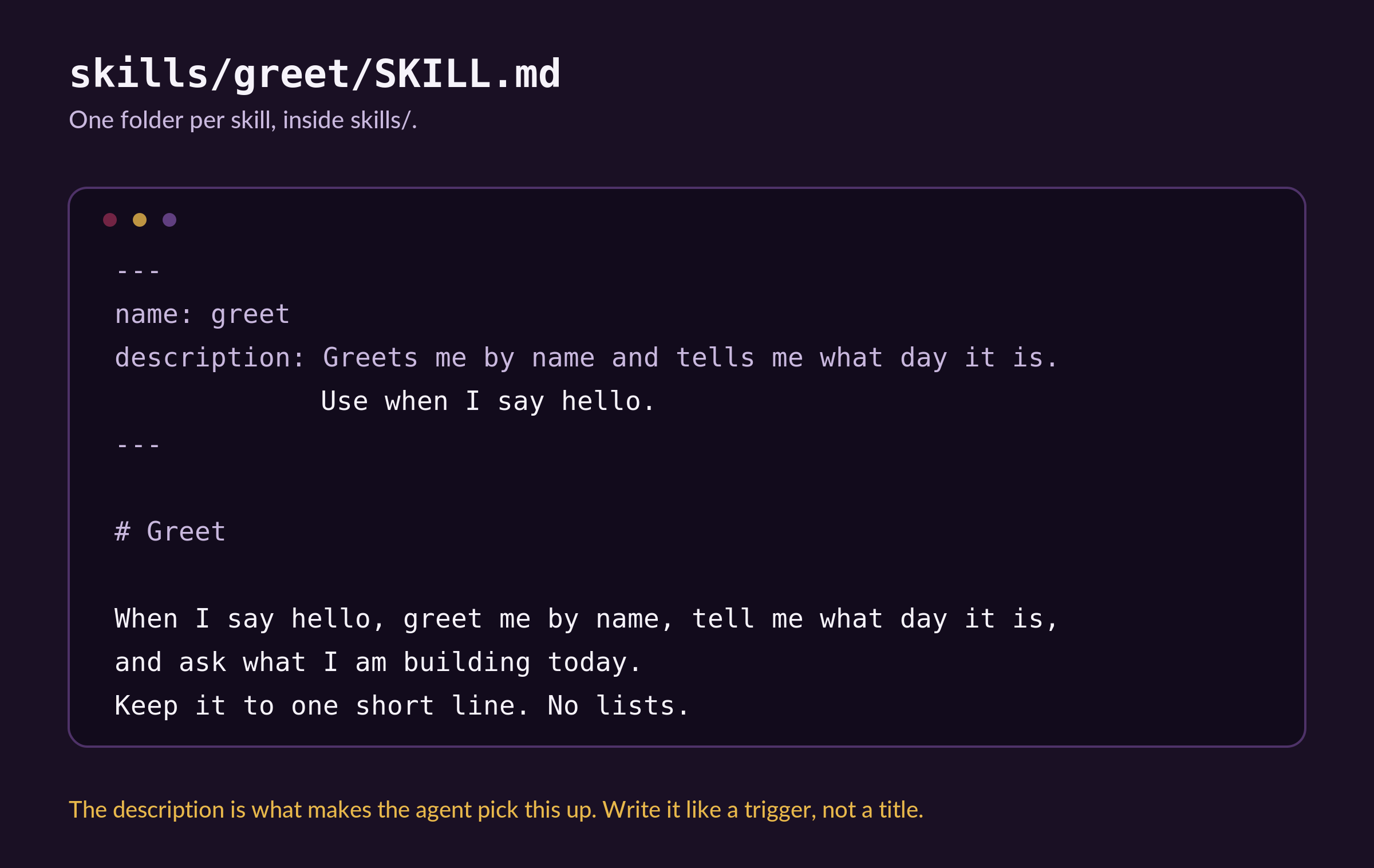
Step 8: Save it. You are done.
That folder is now a valid plugin, and every app in that list further up understands it. Read that again, because that is the part that is new. Six months ago the same folder only meant something to one company’s app.
Know someone who has rewritten the same AI instructions five times this month? Send this over.
3. Add your tools, if you have any.
Skip this whole section if your plugin is just instructions. It will still work perfectly.
Read on if your plugin needs to actually reach something, like your calendar, your notes, or a service you already pay for.
Those connections are called MCP servers. You have probably used one already without knowing it had a name.
They go in a file called mcp.json, sitting right next to plugin.json, and there is one rule that matters.
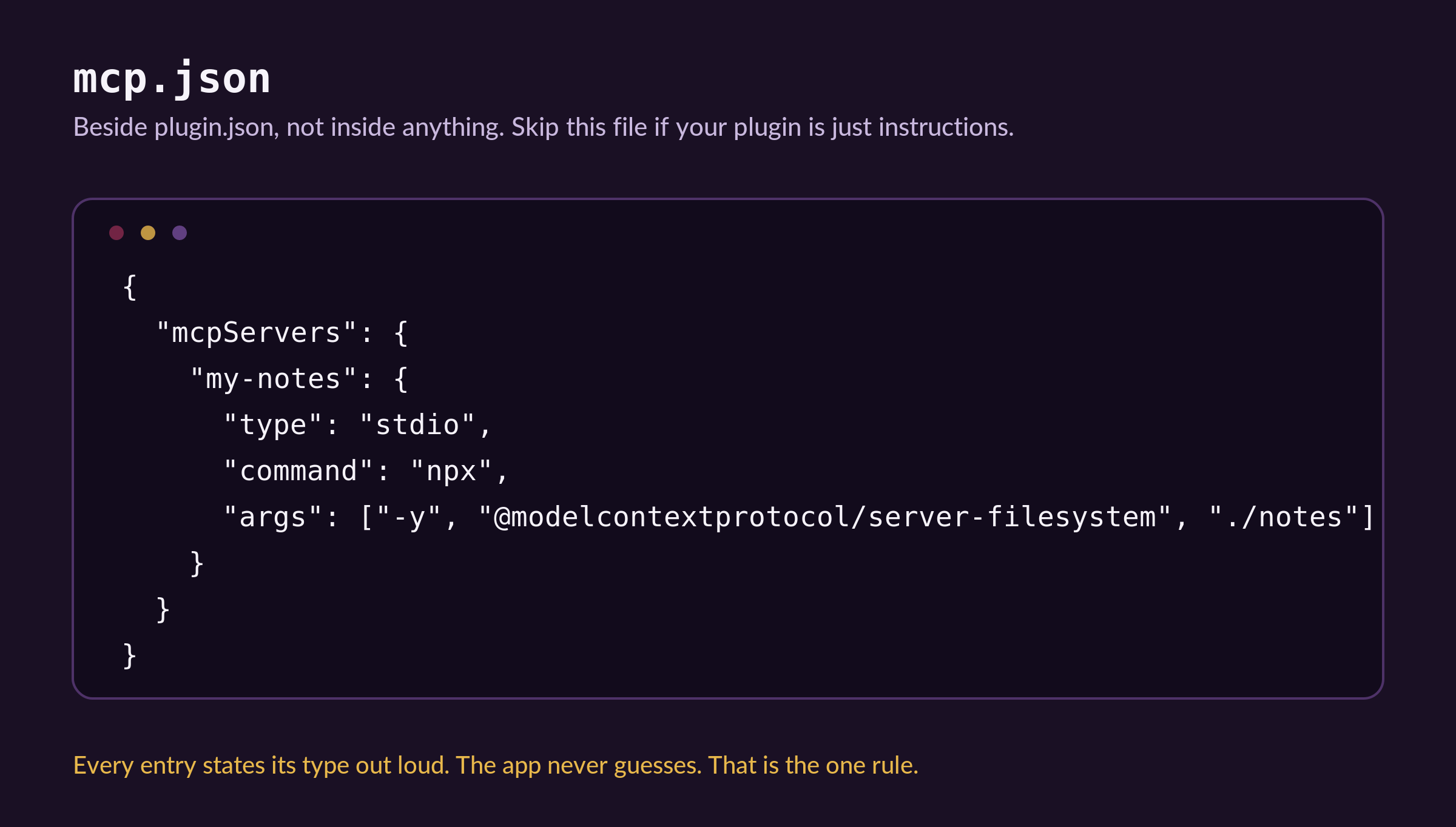
Old setups let the app work out the connection type from the shape of your config, which failed in quiet, maddening ways.
Now you say it plainly, and it either works or it tells you why not.
And here is the honest advice the spec authors give themselves, which I appreciated.
Do not reach for a plugin if you do not need one. One skill on its own does not need a plugin. One tool connection on its own does not need one either.
A plugin earns its place when you have pieces that belong together and need to travel together.
(A company telling you when NOT to use their new thing is rarer than the new thing.)
Where this falls short (being honest).
Claude and Antigravity do not read it yet. Seven clients do, and that list is genuinely impressive for something four days old, but the two tools I use most are not on it. If you build a plugin and Claude ignores the folder, the folder is not broken. Check the live list on the day you try, because it is moving fast.
There is no install button. Version one is only the box, not the delivery van. No app store, no one-click install, no update mechanism. Right now you move the folder yourself. The authors say this out loud rather than hiding it, which I respect, but it does mean sharing a plugin today is still “here, take this folder.”
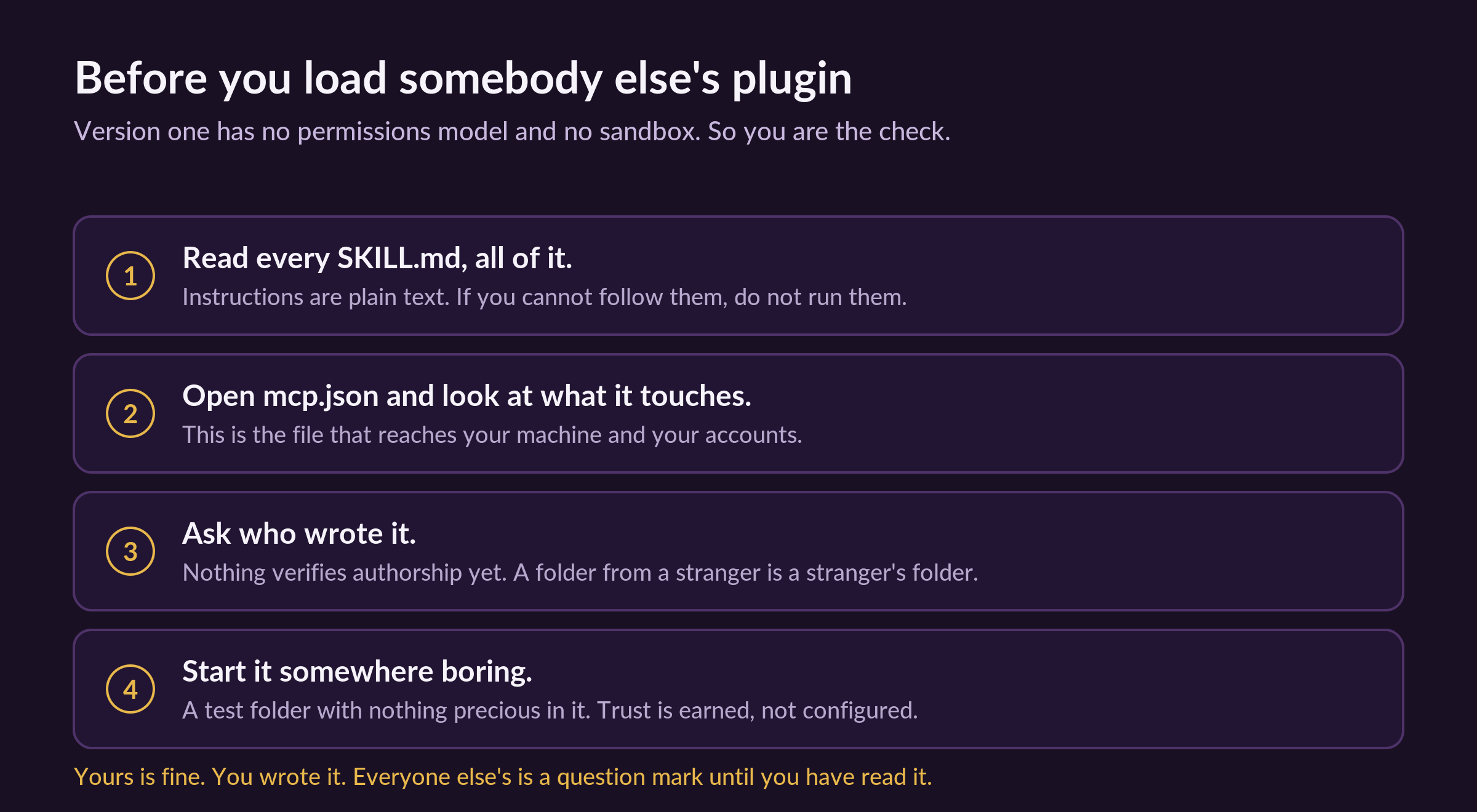
Nothing checks whether a plugin is safe. No permissions model, no sandbox, no way to verify who wrote it.
It will not fix bad instructions. A portable copy of a vague instruction is a vague instruction that now travels further. The folder shape is the easy part. Writing instructions clear enough that an agent gets it right first time is still the actual work, and it always will be.
I did not expect to write about a folder layout.
Nobody paid me for this. None of these companies know I exist.
I wrote it because the fix here is unglamorous and small, and unglamorous small fixes are the ones that quietly give you your Mondays back. The exciting announcements rarely change how my week runs. This one did, and it did it by deleting work rather than adding a tool.
And the nicest thing you can do for me costs nothing. Send this to one person who is on their fourth copy of the same instructions and does not know they can stop. This newsletter grows one forward at a time.
If someone forwarded you this one, thank them, then subscribe so the next one finds you too.
Save this. The whole thing in six lines.
A plugin is a folder. That is not a simplification, it is the definition.
plugin.json is two lines. A schema line and a name. Nothing else.
Instructions live in skills/, one folder each, with a SKILL.md inside.
Tools live in mcp.json, beside plugin.json, and every entry states its type.
Fixed locations are the feature. You cannot get clever, and that is exactly why it travels.
One skill on its own does not need a plugin. Pieces that travel together do.
PS: If you build one, reply and tell me what your first skill was. Mine greeted me by the wrong name for two days because I typed the description badly. Small mistake, easy fix, still funny.
What are your thoughts on MCP?