
Free.
The exact $0 stack I use to build AND ship a live app in 1 week.

Most people stop at “it works on my screen.”
They build something in a browser, it looks great, they screenshot it, and they post it.
And then it just… sits there.
On their machine.
Where no one can use it.
There’s a gap between “it runs for me” and “there’s a link a stranger can open.”
That gap is where most ideas quietly die.
Two weeks ago, Google made that gap a lot smaller, and they did it for free.
This is the complete stack I’d use to take an idea to a live, working, shareable app in a week, spending zero dollars.
Every tool.
Every step.
The prompts I’d actually paste.
The three places it’ll break, and exactly how to get past each one.
Let’s build.
1. The whole stack, on one hand.
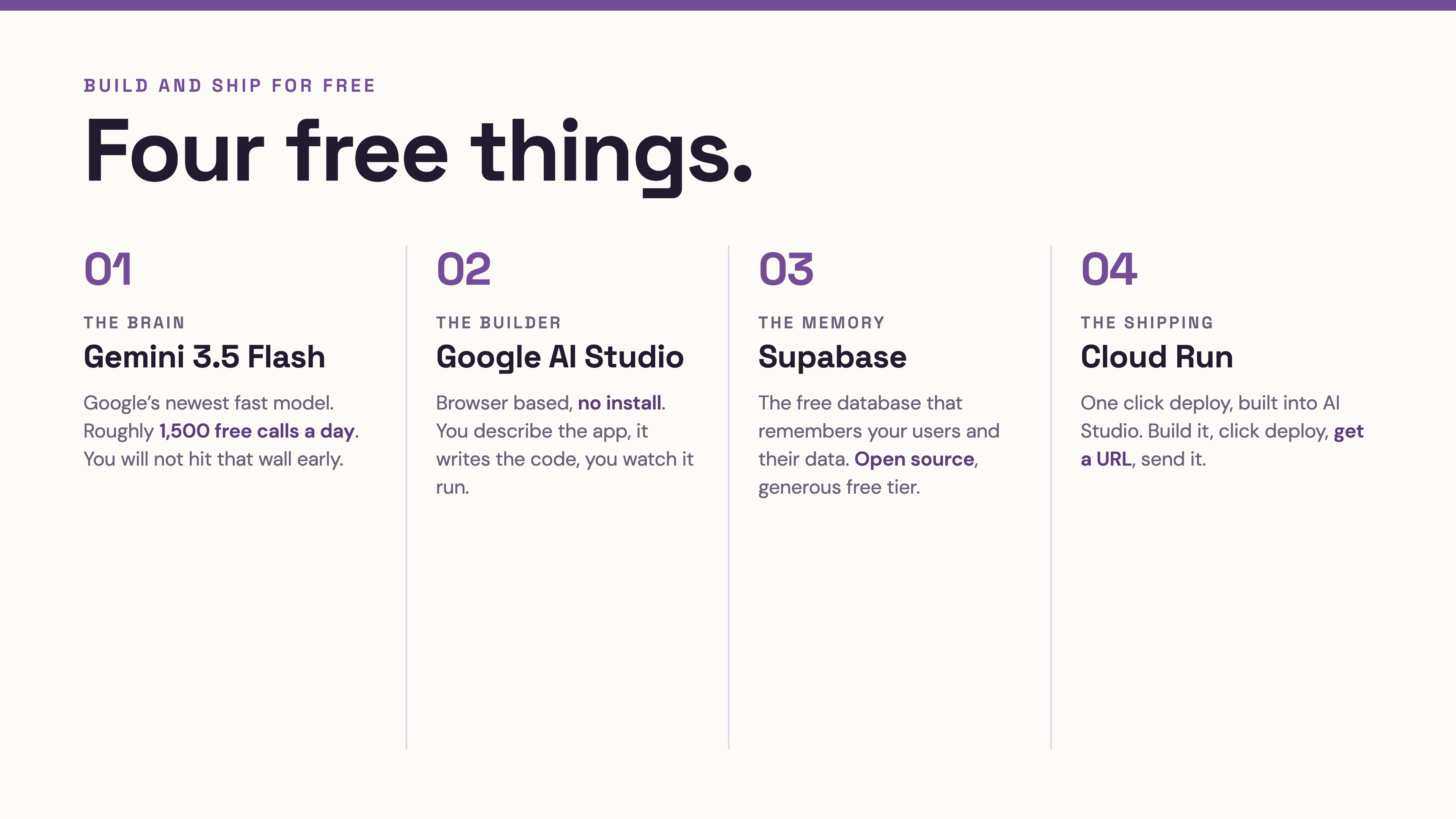
Four free things. That’s it.
⬩ The brain → Gemini 3.5 Flash.
Google’s newest fast model.
It shipped May 19th, and the AI Studio free tier ships with Flash from day one, roughly 1,500 calls a day, no credit card.
For a project that’s getting off the ground, you will not hit that wall.
⬩ The builder → Google AI Studio.
Free, browser-based, no install. You describe the app, it writes the code, you watch it run.
⬩The memory → Supabase.
The free database that remembers your users and their data.
Open source, generous free tier, and the one I connect to almost every project I build.
⬩ The shipping → Cloud Run, through AI Studio’s new one-click deploy.
This is the new part.
This is how you get the link.
Old way: build something, then spend a frustrating weekend trying to figure out how to put it online, then give up.
This way: build it, click deploy, get a URL, send it to someone. Same afternoon.
(The shipping step used to be the part that broke people. Google just turned it into a button.)
2. Step one: build the thing in AI Studio.
Open aistudio.google.com.
Sign in with a Google account.
That’s the entire setup.
The default model is now Gemini 3.5 Flash, which is tuned for exactly this kind of work, so you don’t need to change anything.
Here’s the build prompt.
Notice what it does. it forces a small first version.
Small is the secret.
A small thing that works beats a big thing that half-works every single time.
You are helping me build a working web app. I am a non-technical
founder, so explain your decisions in plain language as you go.

The app: [ONE OR TWO SENTENCES — e.g. "a simple tool where a user
signs in, writes a daily note, and sees a list of all their past
notes by date"]

Build version one with ONLY these:
- One main screen
- The single most important action (the thing the app exists to do)
- Clean, simple, mobile-friendly design

Do NOT add login or a database yet. I want to see the core action work
first with placeholder data.

When it's built, tell me:
1. What this version does
2. Exactly what's fake/placeholder right now
3. The two things we add next to make it real

Then show me the live preview.
Run it.
Click around the preview.
Break it on purpose, tap things, see what happens.
This first version is intentionally fake.
The data isn’t saved.
That’s correct.
We’re proving the shape of the app before we wire up the plumbing.
3. Step two: give it a memory (Supabase, free).
Right now your app forgets everything on refresh.
We fix that with a database.
I lead with Supabase here for one reason: it’s free, it’s reliable, and it’s the most direct fit for an AI-built app.
⚠️ Tool UIs update often; the exact button names in Supabase and AI Studio may have shifted since I wrote this. The concept holds; if a menu looks different, ask the AI in AI Studio to walk you through the current path.
You’ll create a free Supabase project, grab two things from it, a project URL and an API key, and hand them to your app.
Then you ask AI Studio to connect them.
Here’s the connection prompt:
I've created a free Supabase project. I want this app to actually save
and load data instead of using placeholders.

Here is what I want stored: [DESCRIBE THE DATA — e.g. "each note has:
the text, the date it was written, and which user wrote it"]

Please:
1. Tell me exactly what table(s) I need to create in Supabase and what
   columns each one has, in plain language
2. Write the code to connect this app to Supabase using the project URL
   and API key (I'll paste mine where you show me)
3. Replace the placeholder data so the main action now saves to and
   loads from the real database
4. Warn me about anything I need to set up in Supabase for this to work
   (like turning on the right access settings)

Explain each step like I've never touched a database. Go one step at a
time and wait for me to confirm before moving on.
The “go one step at a time and wait” line matters.
Without it, the AI dumps everything at once, and you drown.
With it, you actually keep up.
The mistake everyone makes here: pasting your secret keys somewhere public, or skipping the access settings.
A database with the doors wide open is worse than no database.
When the AI mentions row-level security or access rules, do not skip that part. That’s the lock on your front door.
4. Step three: get the link (one-click publish).
This is the new magic, and it’s the step that used to make people quit.
At I/O 2026, AI Studio added one-click deploy to Cloud Run, plus free deployment incentives for first-time builders.
Cloud Run is Google’s way of putting your app on the internet at a real, shareable address.
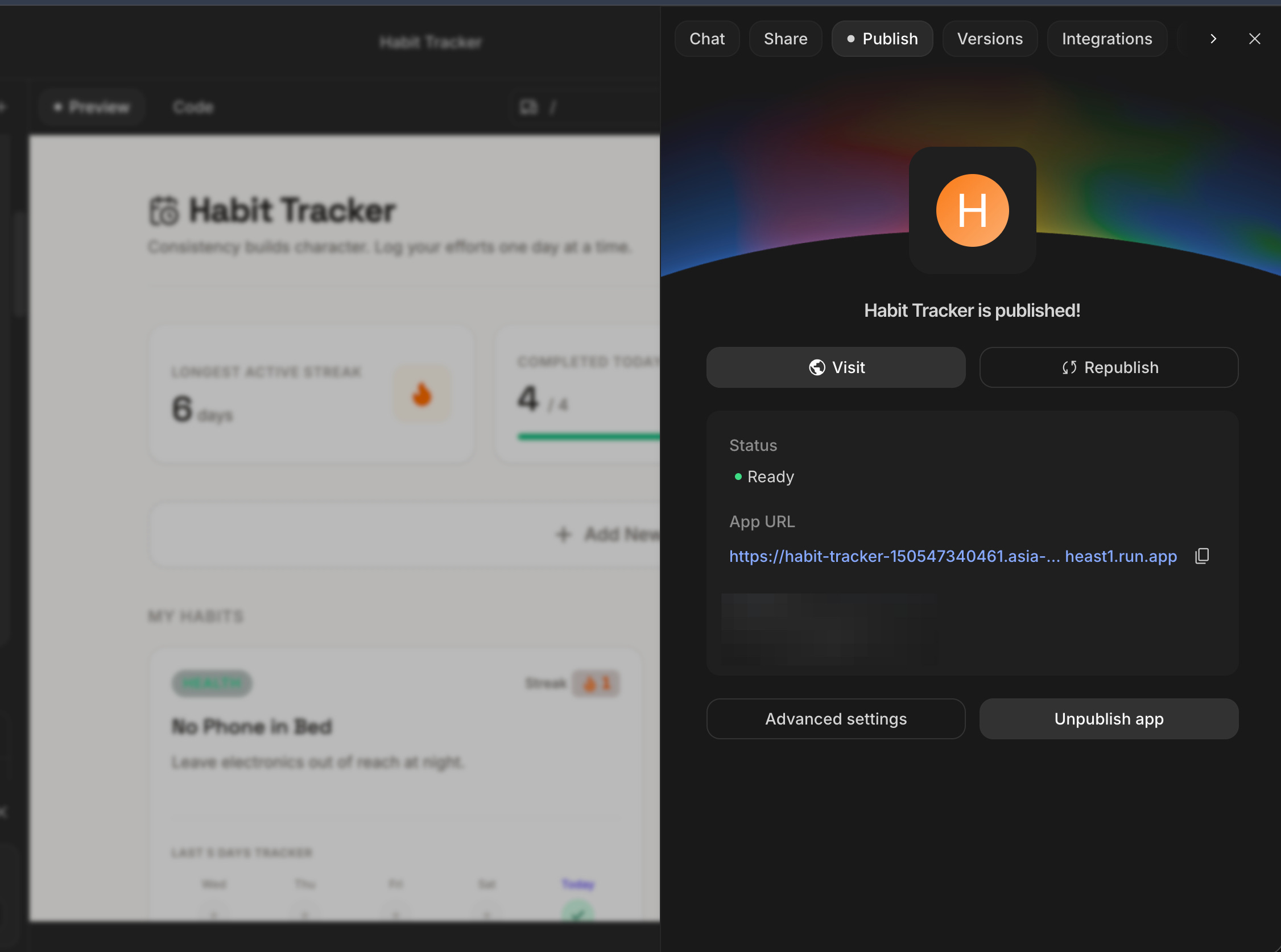
The flow, in concept: you finish your app in AI Studio, you click publish, you connect it to Cloud Run, and a minute later you have a URL.
You send that URL to a friend.
They open it on their phone.
It works.
That’s the moment it stops being a project and starts being a product.
Here’s the prompt to get ready for it cleanly:
I want to deploy this app to Cloud Run from AI Studio and share a live
link. Before I click deploy, check the app for me:

1. Are my Supabase keys handled safely, or are any secrets exposed in a
   way that would leak once this is live? Fix anything risky.
2. Is there anything that works in preview but will break once it's on
   a real URL? Flag it.
3. Walk me through the deploy step in plain language, and tell me what
   to expect to see when it succeeds.

After it's live, give me a 3-item checklist to test on the live link
from my phone to make sure it actually works for a real user.
That step-one check: “are any secrets exposed once this is live”, has saved me more than once.
Things that are harmless in a private preview become public the second you publish.
Catch it before, not after.
5. The three places this breaks, and the fix.
I’ve watched a lot of founders run this exact stack. It breaks in the same three spots every time.
Break #1: The app forgets everything.
You skipped the database step, or the connection didn’t take.
Fix: confirm the data is actually landing in Supabase.
Refresh the app, if your data survives, you’re connected.
If it vanishes, the wiring isn’t done.
Tell the AI: “my data disappears on refresh, the Supabase connection isn’t saving. Debug this with me step by step.”
Break #2: “It worked in preview but the live link is broken.”
Almost always a settings or secrets issue that only shows up once it’s public.
Fix: that’s exactly what the deploy-check prompt above is for.
Run it before you deploy, not after you’re confused.
Break #3: You added too much, too fast.
You built version one, it worked, you got excited, you asked for five features at once, and now nothing works and you can’t tell which change broke it.
Fix: one feature at a time.
Get it working.
Confirm.
Then the next one.
Boring.
Reliable.
This is the actual difference between people who ship and people who have a folder of half-apps.
(Number three is the one that got me, years ago. I learned to slow down the hard way.)
6. Do this once. Run it forever.
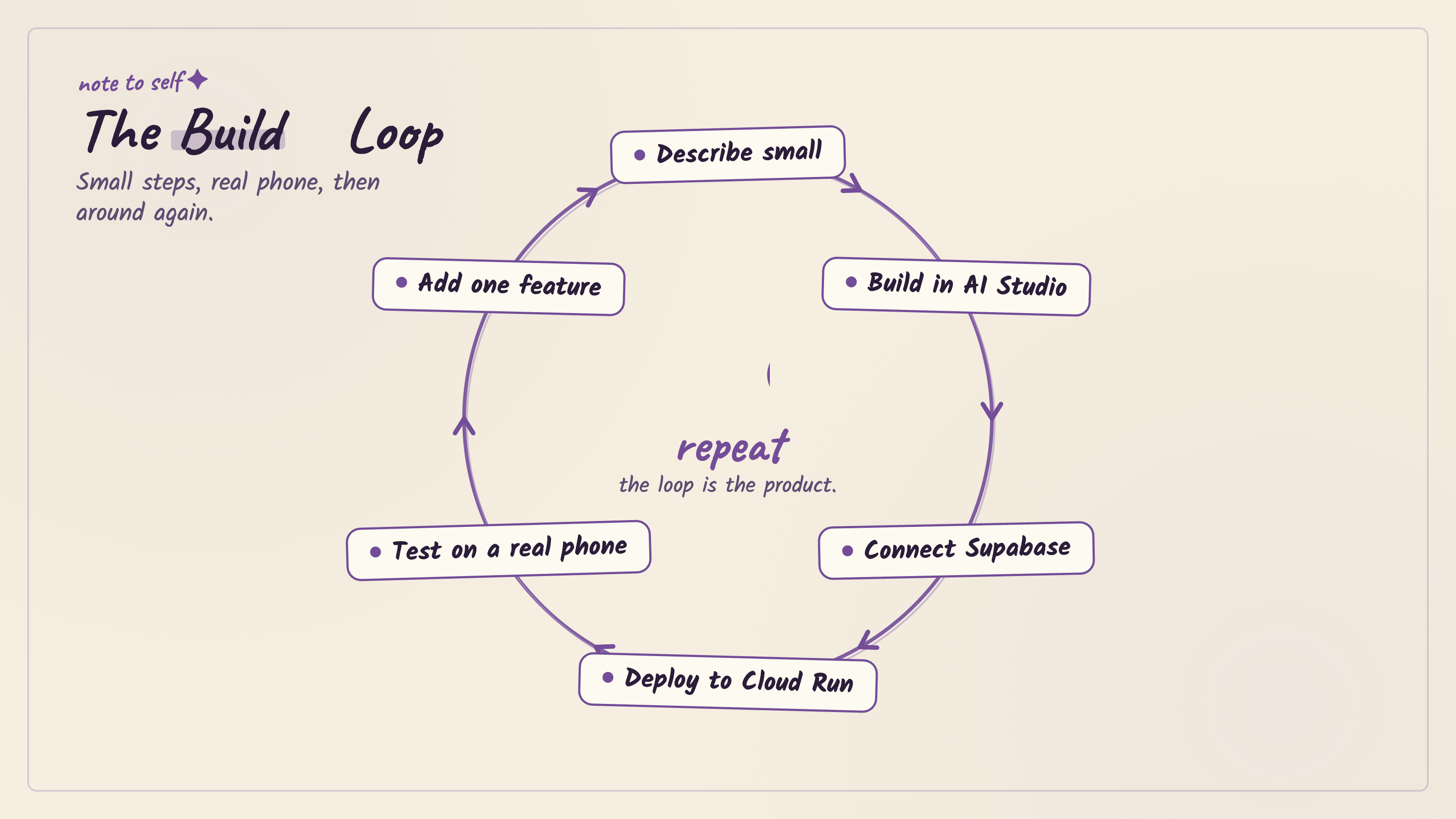
Here’s the loop you now own.
Tape it somewhere.
Describe small → build in AI Studio → connect Supabase → deploy to Cloud Run → test on a real phone → add one feature → repeat.
That’s the whole thing.
Every app I help a founder ship runs on some version of this loop.
The tools will change names.
The loop won’t.
And the entire stack, the brain, the builder, the memory, the shipping, costs zero dollars to start.
You upgrade only when real usage demands it, which is a wonderful problem to have and means something is working.
You don’t need a budget.
You need a tab and an afternoon.
Two ways to take this further, depending on what you need.
If you want to build it yourself, the community is where we run this exact loop every week, alongside other non-technical founders shipping their first real apps.
When you hit one of those three break points, that’s where someone’s already solved it.
→ Join Prompts2Products ($29.99/month)
If you’d rather hand it off to professionals, my agency Arehsoft, builds this kind of product for founders who have the idea and want it done right the first time.
→ Schedule a free consultation call
Both work. Different timelines, different involvement.
Here’s the bonus, the prompt I use to audit a finished app before I tell anyone it’s ready.
I don’t share things I haven’t tested.
This one’s earned its place.
You are a careful, plain-spoken reviewer. I'm a non-technical founder
about to share my live app with real people. Review it for me.

Here's what the app does: [DESCRIBE IT]
Here's the live link: [URL]

Check and report back in plain language:
1. Privacy — is any user data or secret key exposed where it shouldn't be?
2. The core action — does the one main thing the app exists to do
   actually work end to end, including saving and reloading data?
3. The empty state — what does a brand-new user with no data see? Is it
   confusing?
4. The break test — name 3 ways a normal user might accidentally break
   this, and whether each one is handled.

For each issue, tell me how serious it is (must-fix before sharing /
nice-to-have / fine) and the simplest fix. Don't suggest big rewrites.
I’m not here to sell you a stack.
I share what I actually built with.
This week, that’s four free tools that, chained together, take you from a sentence to a live link without a credit card.
Two weeks ago, the shipping step wasn’t a button.
Now it is, so I’m passing it on.
100+ founders read this because someone they trusted sent it to them.
If this one was useful, be that person for someone else.
If someone sent you this, you can subscribe here: