
Claude Code.
The #1 way founders are building real apps in 2026 (and you don’t have to touch a terminal anymore).

You can build a real, working app this year without writing a single line of code.
Not a mockup.
A thing that runs, that opens in a browser, that a stranger can actually use.
New here? Subscribe so the next build lands in your inbox. It’s free.
The tool almost every list crowned as the best builder of 2026 has a slightly scary name.
Claude Code
For two years it lived in a black box on a screen that looked like something only hackers touch.
That part is over.
It goes like this:
Claude Code is the same Claude you already chat with, just pointed at the files on your computer. (yes, the same one)
It used to live only in the terminal, that black text screen that scares normal people. (it scared me too)
In 2026 it got a proper desktop app with buttons and panels, so you never have to see the scary screen.
You type what you want in plain English, the way you’d text a friend who happens to build software.
It writes the actual files, saves them on your computer, and you open the result.
That’s the whole idea.
I’ll show you what it looks like, with screenshots, and I’ll be honest about where it’s still rough.
But first, here’s what “I built this with Claude” actually looks like:
Two things before we start:
Save this, you’ll want it when you finally open the app yourself.
Send it to one founder who keeps saying “I’d build it if I could code.”
Sharing is free, and it’s the nicest thing you can do for a small newsletter (and for me).
First, why I avoided this thing for a year
I’m a developer.
I’ve been shipping software for years, and building products is the work I do every day.
So when Claude Code landed, it was an easy yes for me. (developers ran toward this thing.)
That’s not the part I avoided.
The part I avoided was telling you about it.
Because every single screenshot of Claude Code was a black screen covered in file paths and little green text, and I teach founders who don’t write code.
I knew exactly what that screenshot would do to you.
It would make you quietly close the tab.
It looked like a cockpit.
(It’s the same reason half the founders I work with still believe building is “not for them.”)
Here’s the thing those screenshots never told you.
The person typing into that scary screen often isn’t writing code either.
They’re typing plain sentences, the same way you talk to Claude in a normal chat.
Everything technical on the screen is just Claude narrating its own work as it goes, the way Artifacts already do when you watch them build something live.
(I wish someone had put it that plainly a year ago, before a thousand intimidating screenshots taught a thousand founders to look away.)
So I waited until the tool caught up to the people I teach.
In 2026, it finally did.
If you’ve ever thought “that’s clearly a developer thing,” this newsletter is me leaning over and whispering that you don’t have to be one anymore, and that the live Claude workshop I run inside the community is the room where I sit next to founders while they cross that exact line for the first time (I’ll drop the date at the end, so keep reading).
1. So what is Claude Code, in human words?
Claude Code is an agentic tool.
That word sounds expensive, so let me translate it.
(agentic just means it can take actions on its own, not only answer questions. It can open files, write them, and run things, instead of just talking back.)
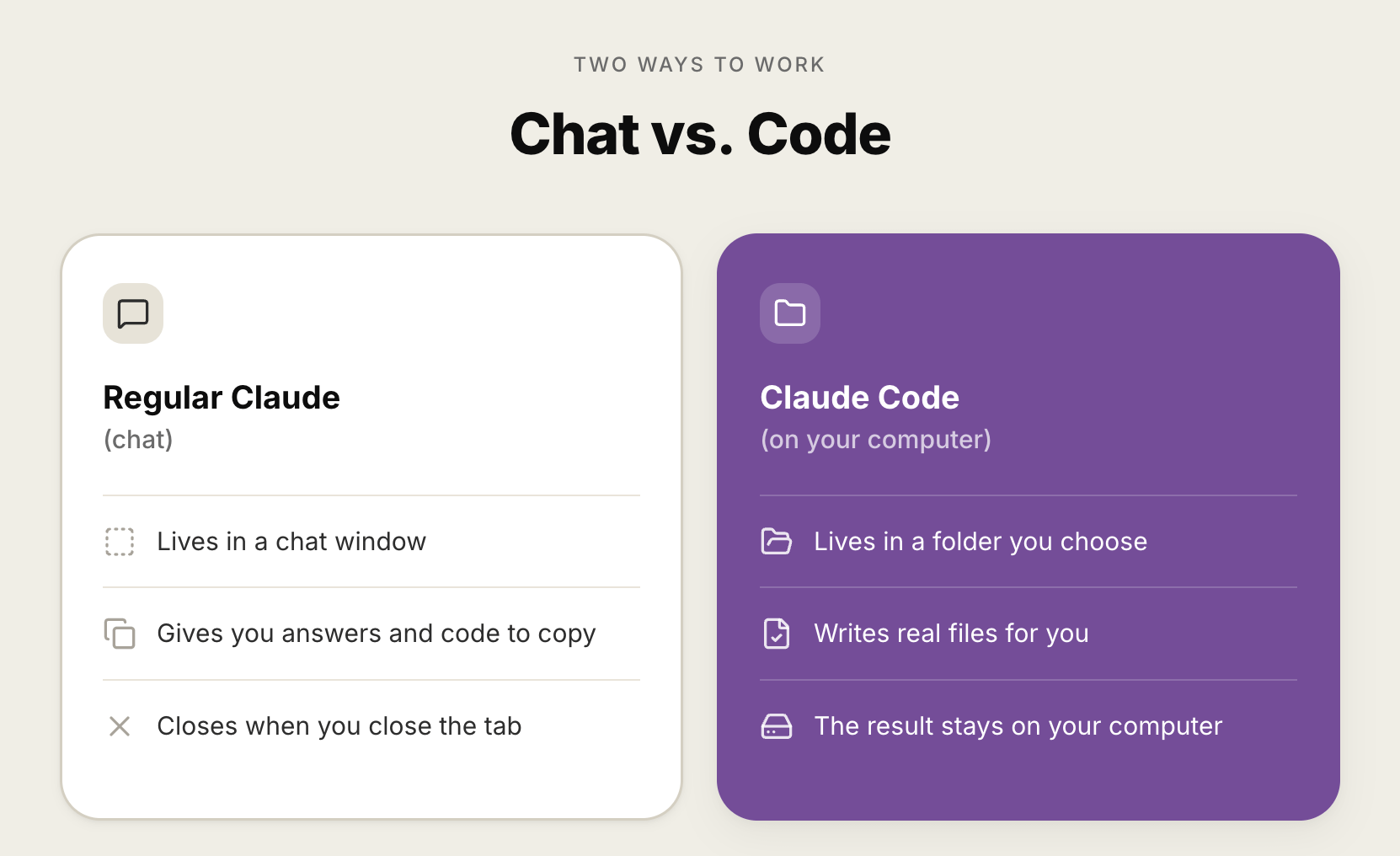
Regular Claude lives in a chat window.
You ask, it answers, and anything it builds sits inside that chat until you close the tab.
Claude Code lives on your computer instead.
You point it at a folder, the same way you’d hand someone a drawer and say “work in here.”
From that moment, it can see the files in that folder, create new ones, and change them for you.
So when you say “build me a simple page with a signup box,” it doesn’t just describe the page.
It writes the real file, drops it in your folder, and you double-click it to open it.
That’s the leap.
Regular Claude gives you the recipe.
Claude Code cooks the meal and leaves it on your counter.
2. The thing that changed in 2026 (and why I’m writing this now)
Claude Code launched back in early 2025, and for a long time it was terminal only.
That’s why every screenshot looked like a hacker movie.
Then, in April 2026, a fully redesigned desktop app landed for Mac and Windows.
⚠️ It’s Mac and Windows only, not Linux, so if you’re on Linux you’re still in the terminal for now.
This is the part that matters for people like us.
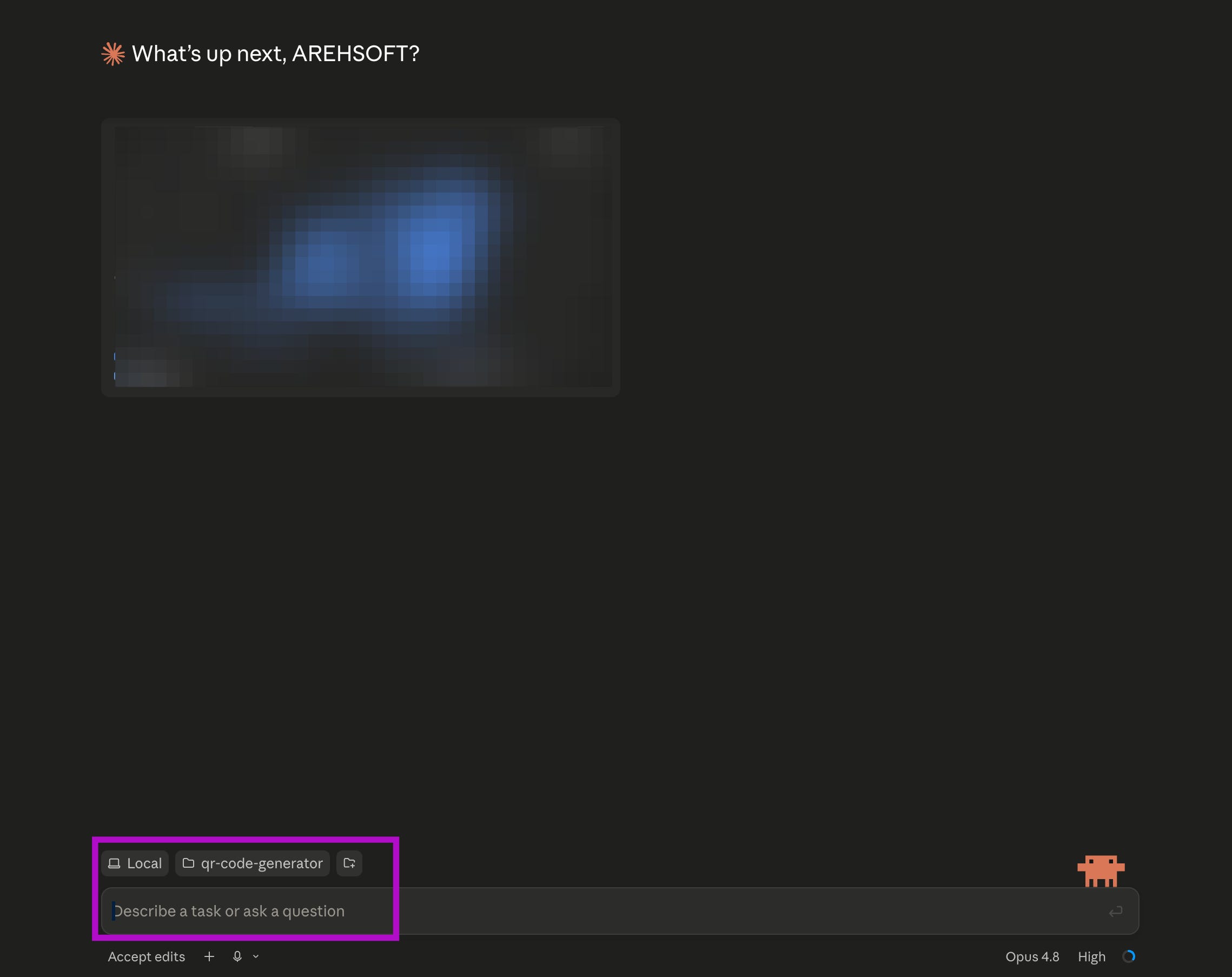
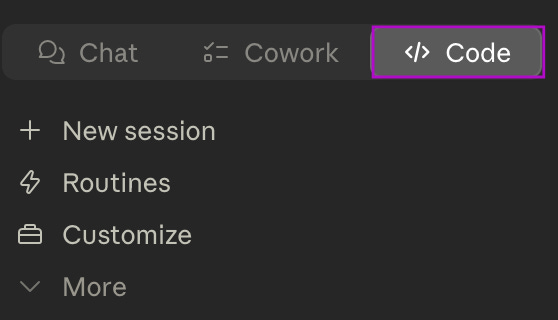
Inside that app there’s a tab called Code, and it gives you panels, buttons, and a normal chat box.
You type your request into the chat box.
You watch it work in a panel.
You never have to memorize a single command.
A designer who openly calls himself a non-coder tried it recently, asked it to build a small color tool, and a working file appeared in his folder a minute later.
No code typed.
That’s the whole reason this is worth your Tuesday.
The tool stopped being a developer-only thing and quietly became a “anyone with an idea” thing.
(And honestly, it’s the same shift that happened with Artifacts last year, just with the results landing on your actual computer instead of inside a chat.)
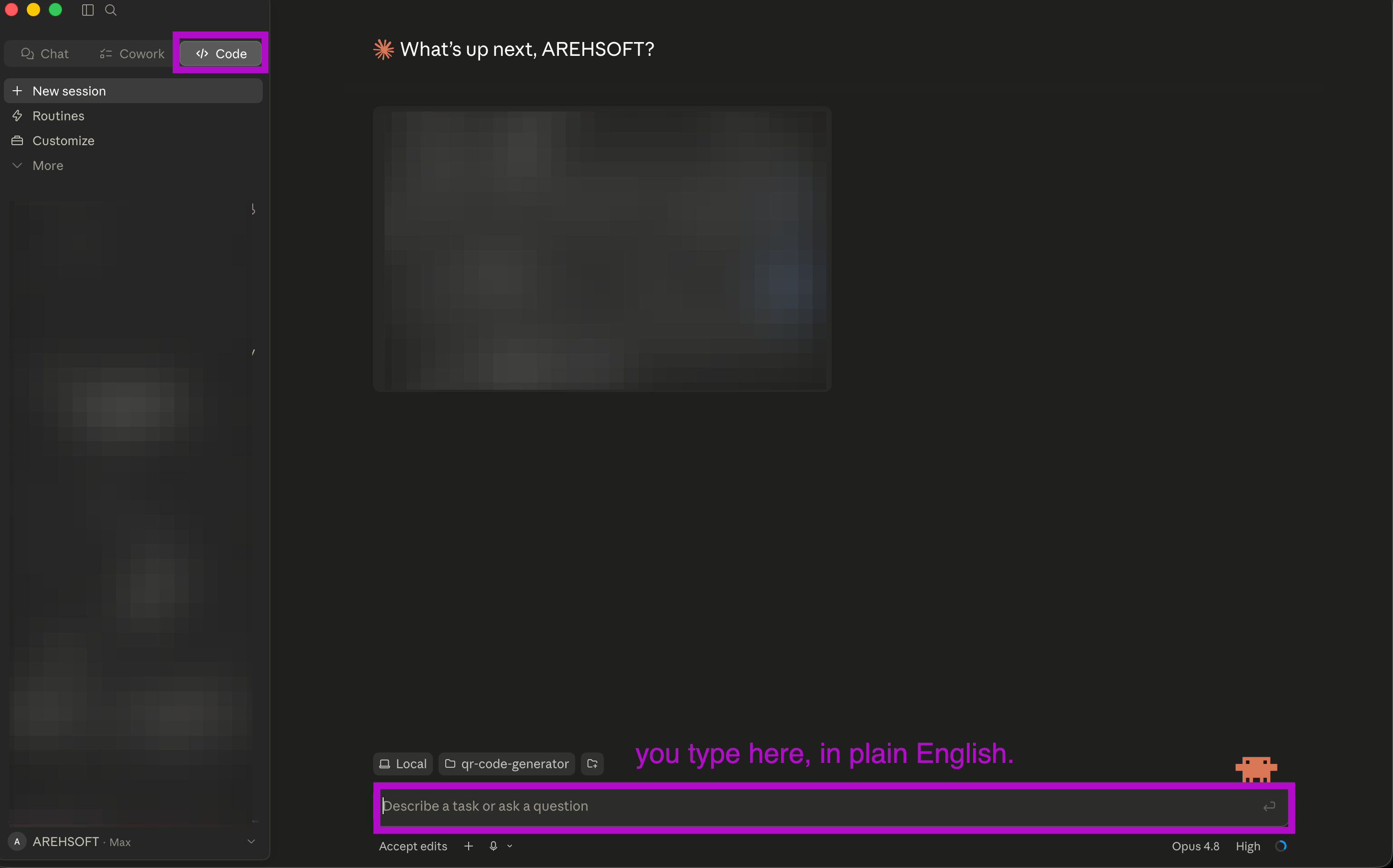
Fifteen seconds of me typing a sentence and a real file showing up. I still find this a little magic.
3. Okay, but what would a founder actually build with it?
Not everything needs to be the next big SaaS.
The best first builds are small and boring and useful.
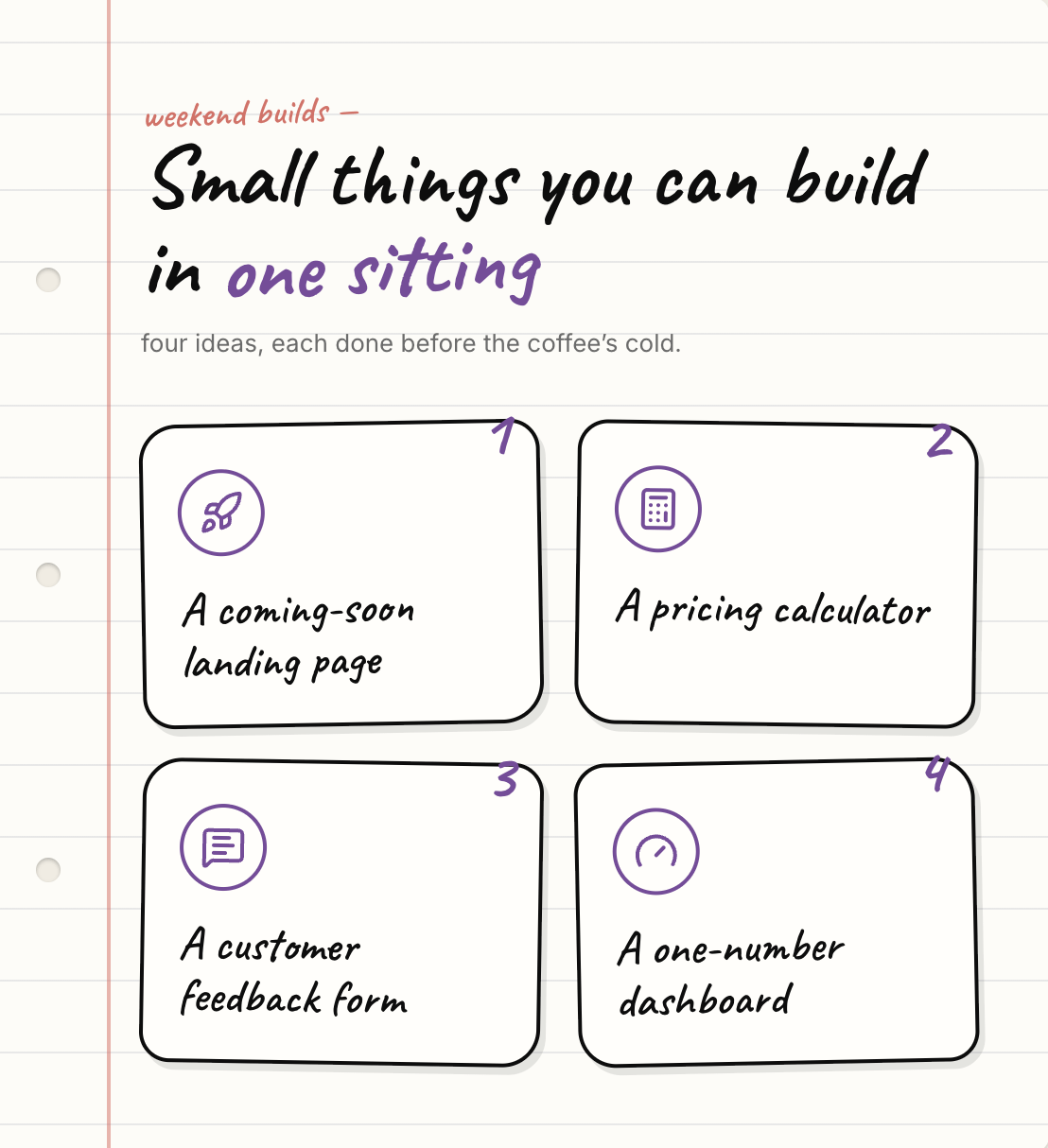
Here’s the kind of thing real founders make in a sitting.
A simple landing page for an idea you want to test this week.
A little internal tool, like a calculator that does your weird pricing math so you stop doing it in your head.
A quick form that collects answers from your first ten customers.
A tiny dashboard that shows you one number you care about.
None of these need a developer.
All of them used to.
That’s the gap that closed.
(I’m a little sorry for the freelancer I would have paid for the pricing calculator. Only a little.)

4. Your tiny first step (do this one thing today)
I’m not going to make you build the whole app today.
That’s Thursday’s job.
Today I just want you to make friends with the tool, so the scary feeling is gone before we start.
Here’s the smallest possible step.
Step 1: If you have a paid Claude plan, open the Claude desktop app. (if you don’t yet, no rush, just read along today.)
Step 2: Look along the top for the tab that says “Code.” Click it.
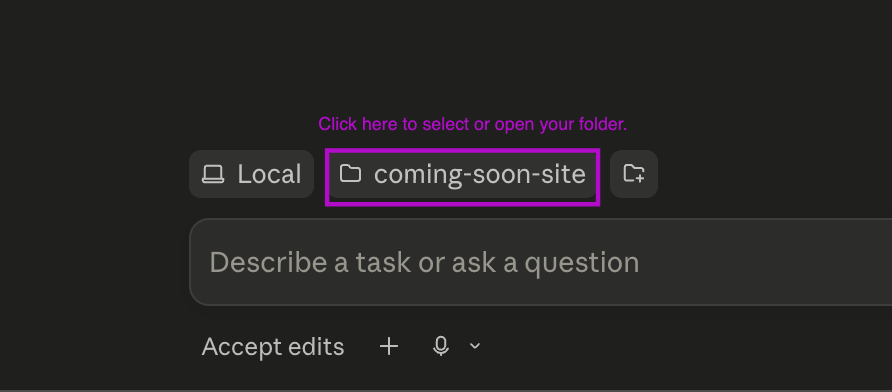
Step 3: When it asks for a folder, make a brand new empty folder on your desktop called “claude-test” and pick that one. (empty on purpose, so nothing important is ever at risk.)
Step 4: In the chat box at the bottom, type this exact sentence:
make me a single web page that says hello, with my name in big friendly letters.
Step 5: Watch the panel. When it’s done, find the new file in your “claude-test” folder and double-click it.
That’s it.
You just made a webpage by typing one sentence.
It’s a silly page.
That’s the point.
The silly page is how the fear leaves.

Where this falls short (being honest).
I’d be a bad friend if I only showed you the magic.
It needs a paid Claude plan. Claude Code isn’t on the free tier, so there’s a monthly cost to use it at all. (it’s the entry paid plan, and I flagged the exact price for myself to keep current.)
It can make a mess if you let it. It has real access to the folder you give it, so I always start it in a brand new empty folder. There are real stories of people pointing an AI agent at something important and losing work. A throwaway folder is your seatbelt.
It’s confident even when it’s wrong. It’ll happily build the wrong thing with total enthusiasm. You stay the boss. You check.
It’s not always the simplest path. For a lot of small things, plain Claude with Artifacts does the job inside a chat with even less fuss. Claude Code shines when you want the result to be a real file on your computer that you’ll keep building on. (which is exactly where Thursday is headed.)
None of these are dealbreakers.
They’re just the honest fine print.
If the scary screenshot kept you out too, we’re even now.
Nobody pays me to say nice things about Claude.
I just build with it every day as a founder, and the black-terminal screenshot is the single thing that kept me out the longest.
So if it kept you out too, that’s the whole reason this one exists.
People read these because someone they trust forwarded it.
If this lifted the lid for you, be that person for someone still staring at a cockpit screenshot thinking “not for me.”
And if a stranger sent you this, hi, thank them, then subscribe so Thursday’s build finds you too.
SAVE THIS, the five-second version:
Claude Code is just Claude, pointed at a folder on your computer.
It writes real files for you, you don’t write code.
The 2026 desktop app means you skip the scary terminal (Mac and Windows).
Always start it in a brand new empty folder.
Your first step today: make the silly “hello” page. That’s it.
PS: The live Claude workshop where we do this together, in the same room, at the same time, is happening this week inside the community.
Master Claude Part 1: The Foundation
Master Claude Part 2: The Power Tools
If “I’d build it if I could” has been your line for a year, that’s the room where the line finally changes.